


How to Install and Use Chroma DB
ChromaDB is an open-source vector database for storing, managing, and searching embeddings in AI applications. You can install it with pip install chromadb, create a persistent database, store documents, and perform semantic searches using Python. For production AI workloads, reliable server hosting provides the CPU, RAM, and storage needed to run ChromaDB efficiently. When choosing a hosting provider, consider data volume, query concurrency, and whether your application also needs GPU resources to generate embeddings.
What Is ChromaDB?
ChromaDB is a vector database designed for AI applications such as semantic search, retrieval-augmented generation (RAG), and natural language processing. It stores vector embeddings alongside documents and metadata, allowing applications to retrieve relevant information based on semantic similarity.
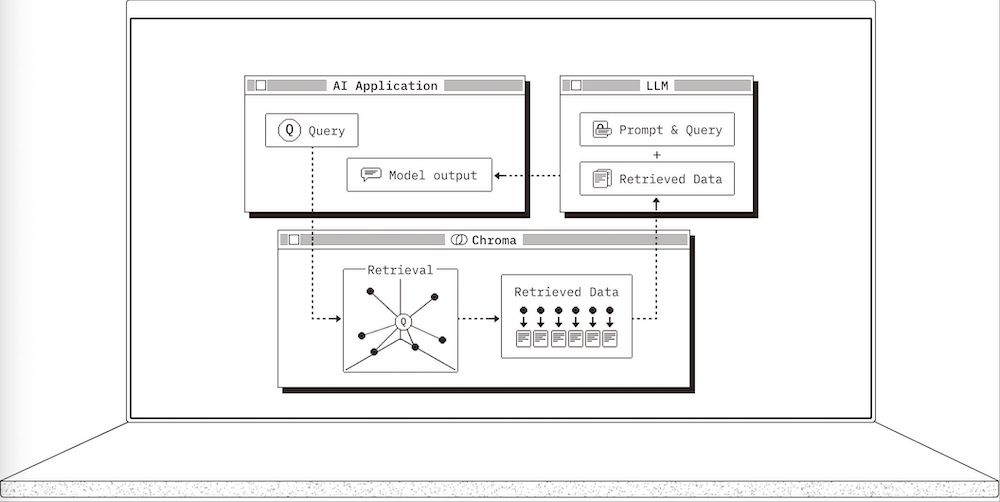
ChromaDB supports Python and integrates with tools such as LangChain, LlamaIndex, and machine learning workflows.
System Requirements
Before installing ChromaDB, prepare the following:
- Operating system: Windows, macOS, or Linux.
- Python: Use a version supported by your selected ChromaDB release.
- CPU and RAM: Allocate sufficient resources for indexing, vector search, and concurrent queries.
- Disk space: Reserve storage for embeddings, metadata, indexes, and database logs.
- GPU: Optional for ChromaDB itself, but useful when generating embeddings with compatible machine learning models.
For larger datasets or production deployments, evaluate memory usage and storage requirements before selecting a server hosting plan. A USA hosting provider may be suitable when your application or users require US-based infrastructure.
How to Install ChromaDB
Step 1: Install the Package
Create and activate a Python virtual environment, then install ChromaDB:
python3 -m venv chroma_env
source chroma_env/bin/activate
pip install chromadb
On Windows, activate the environment with:
chroma_env\Scripts\activateStep 2: Verify the Installation
Run the following command:
import chromadb

print("ChromaDB installed successfully")
If the import completes without errors, the installation is successful. If you encounter dependency errors, check the Python and SQLite requirements for your installed ChromaDB version.
How to Use ChromaDB
1. Create a Persistent Client
Use PersistentClient to save database files locally so they remain available after the Python process exits.
import chromadb

client = chromadb.PersistentClient(path="./chroma_data")
ChromaDB also supports an in-memory client for temporary experiments and an HTTP client for connecting to a separately running Chroma server.
2. Create a Collection
A collection stores documents, embeddings, and metadata for retrieval.
collection = client.create_collection(name="my_collection")3. Add Documents
Add documents with unique IDs. ChromaDB can generate embeddings automatically when a compatible embedding function is configured.
documents = [
    "ChromaDB stores vector embeddings for AI applications.",
    "Vector search helps retrieve semantically relevant documents.",
    "GPU servers can accelerate embedding generation."
]

ids = ["doc1", "doc2", "doc3"]

collection.add(
    documents=documents,
    ids=ids
)
4. Query the Collection
Search for documents related to a natural-language query:
results = collection.query(
    query_texts=["How does vector search support AI?"],
    n_results=2
)

print(results)
ChromaDB returns the closest matching results according to the collection's embedding and distance configuration. The default number of results is typically 10 when n_results is omitted, subject to the number of available records.
Additional Resources
Conclusion
ChromaDB provides a straightforward way to build vector search and RAG applications with Python. Start with a persistent client, add documents, and query the collection before scaling your deployment. For production applications, choose server hosting with sufficient memory, storage, and CPU capacity. Whether you need USA hosting or another location, compare hosting providers based on performance, reliability, and scalability. A GPU is optional for ChromaDB itself but may benefit embedding generation, while a suitable USA hosting provider can offer infrastructure for applications that specifically require US-based servers.