


cPanel vs CloudPanel for Website Hosting
When setting up a website, choosing the right control panel can make a big difference in how you manage servers, deploy apps, and monitor performance. Two of the most popular options today are cPanel and CloudPanel.
cPanel has long been recognized as an industry-standard control panel, trusted by web hosting companies and website owners for its comprehensive features, including email hosting, file management, and DNS configuration. On the other hand, CloudPanel is a newer, lightweight alternative built specifically for cloud environments, offering faster performance and a modern interface optimized for developers and high-performance hosting scenarios.
This article compares cPanel vs CloudPanel across several key areas — usability, features, performance, pricing, and ideal use cases — to help you decide which panel best fits your website hosting needs.
Definition and Highlights
What is cPanel?
cPanel is one of the most widely used control panels in the web hosting industry. It provides an intuitive, browser-based interface that allows users to manage websites, databases, email accounts, and server resources without deep technical knowledge.
cPanel typically works alongside WHM (WebHost Manager) — the administrative layer that helps manage multiple hosting accounts on a single server. This combination is especially popular among shared hosting providers and resellers because it simplifies multi-account management and billing integration.
Key highlights of cPanel include:
- Comprehensive functionality: Built-in tools for file management, database control, DNS configuration, backups, and email hosting.
- Wide compatibility: Supports Apache, LiteSpeed, and various PHP versions on Linux-based systems.
- Stable ecosystem: Backed by years of updates and third-party plugin support.
In short, cPanel is ideal for users who value stability, compatibility, and all-in-one hosting management — it comes with a slightly heavier system footprint and a paid license.
What is CloudPanel?
CloudPanel is a modern, lightweight control panel designed specifically for cloud servers and high-performance applications. It focuses on speed, simplicity, and security, using an optimized NGINX + PHP-FPM + MariaDB stack to deliver exceptional efficiency.
Unlike cPanel, CloudPanel is completely free and open-source. Its clean, responsive web interface provides quick access to website management, database creation, SSL setup, and system monitoring — all without unnecessary overhead.
Key highlights of CloudPanel include:
- Performance-focused design: Built for VPS, dedicated, and cloud environments with minimal resource usage.
- Modern stack support: Compatible with PHP, Node.js, Python, and WordPress.
- Strong security features: Integrated firewall, automatic SSL certificates, and user isolation.
CloudPanel is best suited for developers, agencies, or businesses that prioritize performance, scalability, and cloud-native deployment — without needing bundled services like email or DNS hosting.
Installation and System Requirements
When choosing between cPanel and CloudPanel, installation complexity and system requirements are often major deciding factors — especially for users managing their own VPS or dedicated servers.
cPanel Installation
Setting up cPanel is relatively straightforward but requires a licensed installation and a clean Linux environment (typically CentOS, AlmaLinux, or CloudLinux). The installation process is automated via a script provided by cPanel, though it may take 30–60 minutes depending on server resources.
However, cPanel is resource-intensive and designed for long-term, multi-account environments. Once installed, it’s not easily removed without a full OS reinstall, making it more suitable for production servers rather than test setups.
Minimum Requirements for cPanel:
- OS: CloudLinux, AlmaLinux, or Rocky Linux
- CPU: 1.1 GHz or higher (2+ cores recommended)
- RAM: 2 GB minimum (4 GB+ recommended)
- Storage: 40 GB minimum
- License: Required (monthly or annual plans)
CloudPanel Installation
CloudPanel is designed for simplicity and speed. It’s free and open-source, requiring only a clean Debian or Ubuntu installation. Installation takes just a few minutes using a single command, and it consumes far fewer system resources compared to cPanel.
Its lightweight architecture makes it ideal for modern VPS, cloud, and dedicated environments where performance and scalability are key.
Minimum Requirements for CloudPanel:
- OS: Debian 11/12 or Ubuntu 22.04+
- CPU: 1+ core (2+ recommended)
- RAM: 2 GB minimum (4 GB+ recommended for production)
- Storage: 20 GB minimum
- License: Free (no activation required)
User Interface & Usability
The control panel interface plays a crucial role in how easily users can manage their websites, domains, and applications. While both cPanel and CloudPanel aim to simplify server management, they take very different approaches in design philosophy and user experience.
cPanel: Familiar and Feature-Rich
cPanel offers a classic, icon-based interface that’s familiar to most web hosting users. It organizes tools into categorized sections — such as Files, Databases, Domains, Email, and Security — making it straightforward for beginners to find what they need.
At the same time, cPanel’s integration with WHM (WebHost Manager) provides a second administrative layer for advanced users or resellers. Through WHM, you can manage multiple accounts, configure services, and monitor system performance in detail.
However, because of its wide range of built-in tools, the interface can feel dense or cluttered to new users. It’s powerful but may take time to master — especially for those managing only one or two sites.
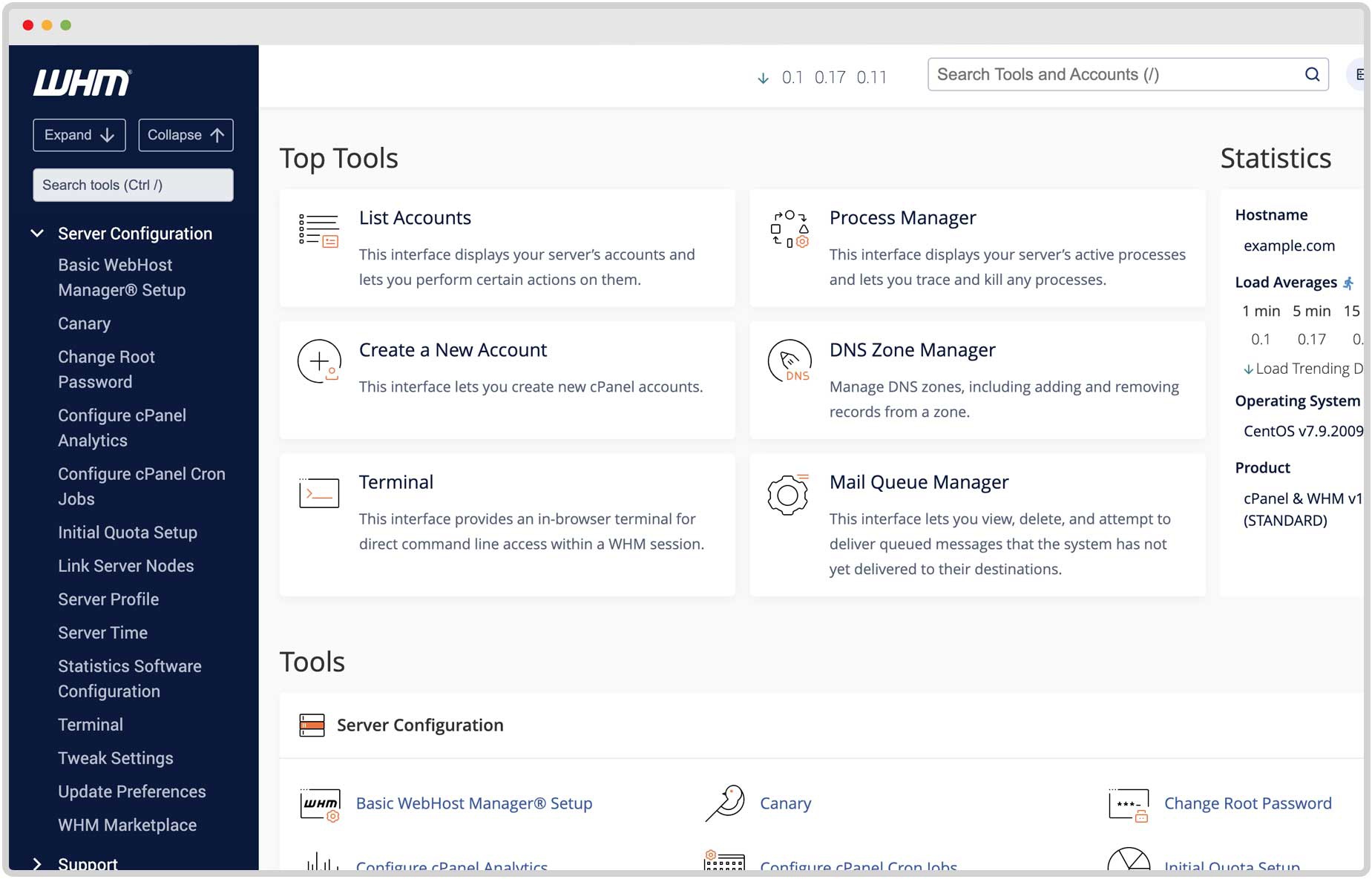
Key advantages of cPanel’s UI:
- User-friendly layout with search and categorized icons
- Consistent experience across hosting providers
- WHM access for multi-account and reseller management
CloudPanel: Clean and Developer-Friendly
CloudPanel, on the other hand, uses a modern, minimalist design optimized for speed and clarity. The dashboard displays essential metrics — CPU, memory, disk usage, and active services — at a glance.
Its interface is built with developers and modern workloads in mind. Instead of dozens of modules, CloudPanel focuses on core tasks: adding sites, managing databases, setting SSL, and configuring users or access rules. The result is a streamlined environment that minimizes distractions and reduces setup time.
For developers comfortable with Linux or command-line tools, CloudPanel’s simplicity is a major advantage — offering all necessary controls without unnecessary extras.
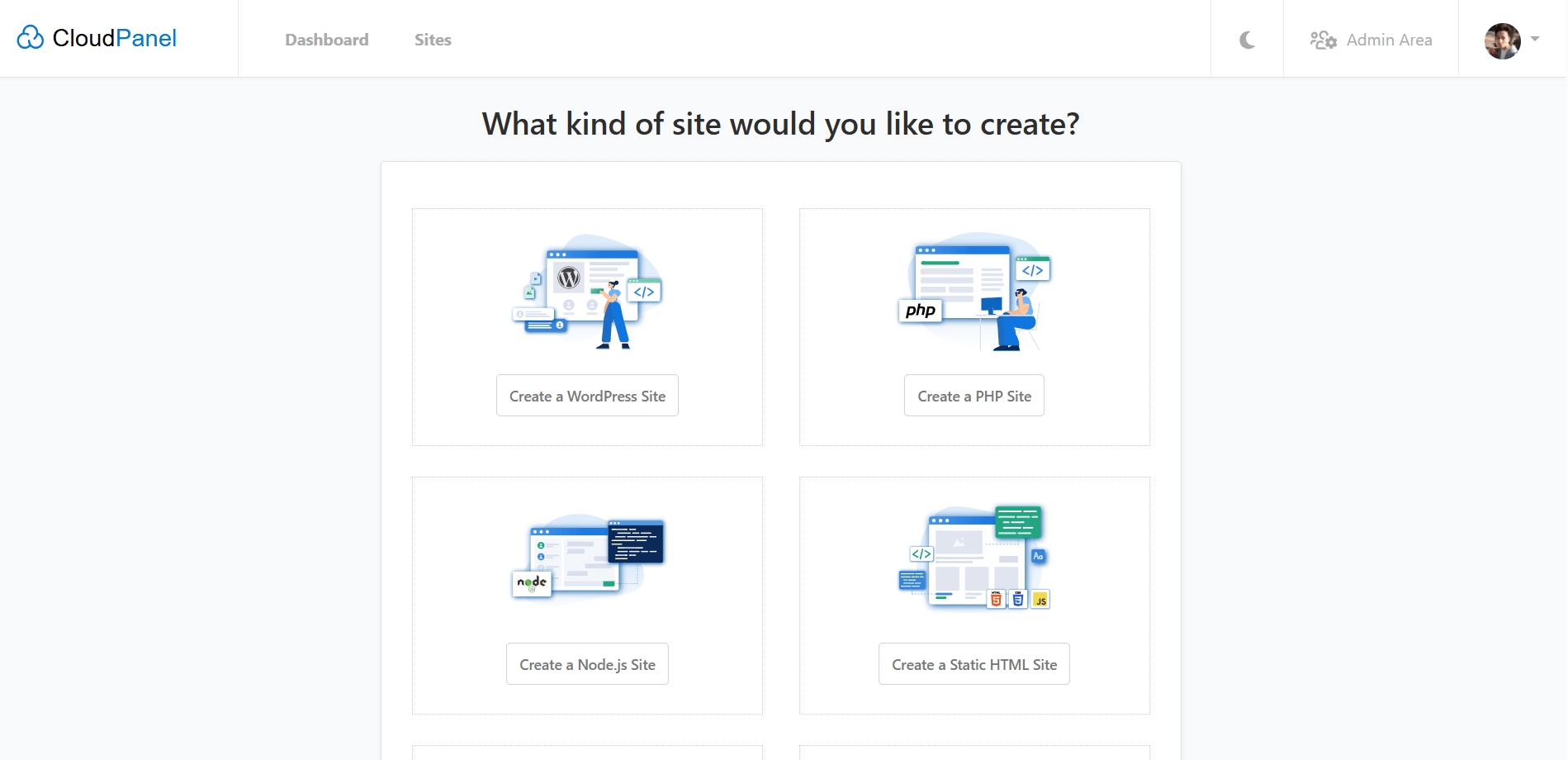
Key advantages of CloudPanel’s UI:
- Modern and responsive web interface
- Fast page loading and minimal clutter
- Designed for developers and technical users
Features Comparison
When comparing cPanel and CloudPanel, the biggest difference lies in their feature sets and how each panel handles core hosting functions.
cPanel offers an all-in-one hosting environment, while CloudPanel focuses on performance, simplicity, and modern frameworks.
| Category | cPanel | CloudPanel |
|---|---|---|
| Web Server | Apache (default), LiteSpeed support | NGINX (optimized) |
| Operating System | CloudLinux, AlmaLinux, Rocky Linux | Debian, Ubuntu |
| Database Management | MySQL, MariaDB, PostgreSQL | MariaDB, MySQL |
| PHP Management | Multiple PHP versions via EasyApache | PHP-FPM with version switching |
| SSL/TLS Certificates | AutoSSL integration (Sectigo or Let’s Encrypt) | Built-in Let’s Encrypt (automatic setup) |
| Email Hosting | Built-in (Exim, Dovecot) | Not included (external service needed) |
| DNS Management | Full DNS zone editor | Requires external DNS |
| Backup Tools | Integrated automated backup | Manual or third-party backup integration |
| File Management | File Manager in UI + FTP/SFTP access | SFTP and command line only |
| Security Features | CSF Firewall, ModSecurity, account isolation | Firewall, Fail2Ban, automatic SSL |
| User Accounts | Multi-account via WHM | Role-based user access |
| API Access | WHM API & UAPI | REST API and CLI tools |
| Resource Monitoring | Integrated usage stats | Real-time server metrics |
| Application Support | WordPress, Joomla, Drupal, etc. | PHP, Node.js, Python, Go |
| Email Forwarding & Filters | Yes | No |
| Cron Jobs / Scheduler | Yes | Yes |
| License | Paid | Free |
| Target Audience | Hosting companies, resellers, SMBs | Developers, SaaS, Cloud users |
Key Insights
- cPanel delivers a complete hosting suite, including DNS and mail servers, making it ideal for traditional hosting environments or reseller businesses.
- CloudPanel trims down non-essential features like email and DNS to stay lightweight and optimized for performance-first cloud deployments.
- If you need modern web app support (Node.js, Python, Laravel, etc.), CloudPanel provides a more flexible and faster base environment, and it's free.
- If you’re managing multiple clients, domains, and email accounts, cPanel remains the more convenient choice due to its integrated services and long-standing ecosystem.
Performance & Resource Efficiency
Performance is one of the most important factors when choosing a hosting control panel — it directly affects page load times, server stability, and how efficiently your hardware resources are used.
Both cPanel and CloudPanel are capable of running production-grade websites, but they differ greatly in system footprint and architectural efficiency.
cPanel: Comprehensive but Heavy
cPanel is known for its stability and robust feature set, but that comes at a cost in resource consumption.
It runs multiple background services — including mail, DNS, database, and security daemons — which collectively consume more CPU and RAM even when idle.
This makes cPanel best suited for dedicated servers or high-resource VPS environments, where users need a full-service control panel with minimal manual setup.
Performance Notes for cPanel:
- Uses Apache or LiteSpeed, both highly compatible but less lightweight than NGINX
- Average idle memory usage: ~800MB–1.2GB
- Page response times slightly longer under high traffic load
- Optimized for multi-account hosting, not minimal resource setups
CloudPanel: Lightweight and Optimized for Speed
CloudPanel was built with efficiency at its core.
It uses a pure NGINX stack with PHP-FPM and MariaDB, avoiding unnecessary background processes like mail and DNS servers.
The result is noticeably faster website delivery and reduced server load — even on smaller VPS instances.
For dynamic sites and modern frameworks, CloudPanel’s optimization can lead to lower CPU usage and faster response times, particularly under concurrent traffic.
Performance Notes for CloudPanel:
- NGINX + PHP-FPM stack ensures low latency and high concurrency
- Average idle memory usage: ~300–500MB
- Significantly faster setup and restart times
- Ideal for SSD-based cloud or GPU servers focusing on performance workloads
| Metric | cPanel | CloudPanel |
|---|---|---|
| Web Server | Apache / LiteSpeed | NGINX |
| Average Idle RAM Usage | ~1 GB | ~400 MB |
| Average CPU Load | Moderate | Low |
| Response Time (Static Pages) | 180–250 ms | 90–120 ms |
| Page Caching Support | Yes (via plugins) | Native FastCGI caching |
| Boot Time | 3–5 min | < 1 min |
| Best For | Shared hosting, email-heavy setups | High-performance web apps, cloud servers |
In summary, CloudPanel delivers a clear performance advantage for most modern workloads thanks to its lean architecture and NGINX-based stack. Meanwhile, cPanel remains a strong choice for all-inclusive hosting environments where convenience and compatibility outweigh raw efficiency.
Security and Backup Options
Security is a core requirement for any hosting environment. Both cPanel and CloudPanel include a strong set of built-in protections, though their approaches differ depending on target users and hosting models.
cPanel: Mature Security Ecosystem
cPanel has been refined over decades of use in shared and reseller hosting environments, so its security features are comprehensive and battle-tested.
It integrates multiple layers of protection, from account isolation to system-level firewalls and malware scanners.
Key Security Features in cPanel:
- AutoSSL: Automatically installs and renews SSL certificates for all hosted domains.
- Account Isolation: Each user operates within a separate environment to reduce cross-account risks.
- Firewall & Port Control: Compatible with tools like CSF (ConfigServer Security & Firewall) for port management and intrusion blocking.
- ModSecurity Integration: Helps filter and block malicious web traffic.
- Password & Brute-force Protection: Built-in cPHulk system detects and blocks repeated login attempts.
For backups, cPanel includes flexible options that allow full, incremental, or remote backups (to local disk, remote FTP, or cloud storage). This makes it easy to automate daily or weekly data protection routines.
Backup Highlights:
- Built-in Backup Wizard and Remote Backup options
- Scheduled backups with retention policies
- Easy account-level or full-server restoration
CloudPanel: Lightweight but Secure by Design
CloudPanel takes a more minimalistic approach but still offers strong default security.
Since it’s optimized for dedicated or VPS environments, it focuses on system hardening and real-time protection rather than multi-tenant isolation.
Key Security Features in CloudPanel:
- Built-in Firewall: Simplified management of inbound and outbound ports directly from the dashboard.
- Fail2Ban Integration: Protects SSH and web access from brute-force attacks.
- Automatic SSL Certificates: Let’s Encrypt integration for HTTPS with one-click setup.
- User Isolation: Each site runs under its own system user for added safety.
- System Updates & Monitoring: Provides server health stats and logs for proactive management.
Unlike cPanel, CloudPanel doesn’t include an integrated backup system, but it easily connects with external tools like rclone, rsync, or cloud snapshots (e.g., AWS, Google Cloud, or custom cron-based backups).
Backup Highlights:
- Manual or automated via command line
- Works well with cloud provider snapshot systems
- Lightweight configuration with full control over schedule and storage
| Aspect | cPanel | CloudPanel |
|---|---|---|
| SSL Management | AutoSSL for all domains | Built-in Let’s Encrypt |
| Firewall | CSF + Port Control | Integrated Firewall |
| Brute Force Protection | cPHulk | Fail2Ban |
| Account Isolation | Yes (multi-user) | Yes (per-site user) |
| Malware Protection | ModSecurity & Plugins | Not built-in (external tools) |
| Backup System | Integrated, automated | Manual or external |
| Best For | Shared / reseller hosting | VPS / cloud environments |
In summary, cPanel provides a full-featured, automated security suite ideal for shared hosting and multi-account management, while CloudPanel focuses on a secure-by-default, minimal surface approach that suits developers and cloud deployments.
Pricing and Licensing
Licensing cost is often one of the most decisive factors when selecting a hosting control panel. While CloudPanel is entirely free to use, cPanel operates under a commercial licensing model that can significantly influence overall hosting costs — especially for multi-account environments.
cPanel: Paid and Account-Based Licensing
cPanel is a commercial product that requires a valid license to operate. Pricing is based on the number of accounts (domains or hosting users) created within the system, and licenses are billed monthly or annually.
Over the years, cPanel has transitioned from flat-rate licensing to a tiered, per-account model. This shift makes it costlier for resellers or providers hosting multiple customers on a single server, though still manageable for single-site setups.
Typical Pricing Structure:
- Admin License: Up to 5 accounts – most suitable for small businesses
- Pro License: Up to 30 accounts – common for growing hosting providers
- Premier License: Up to 100 accounts or more – designed for large-scale environments
Pricing varies slightly depending on whether the license is purchased directly or via a hosting partner, but it generally ranges between $20–$60/month per server, depending on the plan and account count.
Included in the License:
- Access to both cPanel and WHM
- Ongoing updates and security patches
- 24/7 vendor support and official documentation
CloudPanel: 100% Free and Open Source
CloudPanel stands out with its completely free and open-source licensing model.
There are no subscription fees, activation costs, or feature restrictions — users can deploy it on any number of servers or domains without limitation.
Because it’s open source, CloudPanel is particularly appealing to developers, startups, and cloud users who prefer flexibility and cost efficiency. It also integrates easily with cloud infrastructure providers like AWS, Google Cloud, Azure, or Databasemart’s VPS and dedicated servers.
CloudPanel Licensing Highlights:
- Free for commercial and personal use
- No account limits or upgrade tiers
- Community-driven development and updates
- Optional paid support available from third-party providers (not required)
| Aspect | cPanel | CloudPanel |
|---|---|---|
| License Type | Commercial | Open Source |
| Cost | $20–$60/month (per server) | Free |
| Account Limits | Tier-based | Unlimited |
| Updates & Support | Included (official) | Free community support |
| Ideal For | Hosting providers, resellers, enterprises | Developers, SMBs, performance-focused users |
In short, cPanel offers enterprise-level reliability and support at a recurring cost, while CloudPanel provides a lightweight, zero-cost alternative ideal for budget-conscious or developer-oriented hosting environments.
Ideal Use Cases
Choosing between cPanel and CloudPanel largely depends on your hosting goals, technical background, and the kind of services or websites you plan to run.
While both panels are capable of managing production-grade servers, each one is optimized for a different type of user and hosting environment.
When to Choose cPanel
cPanel is the best fit for users who want a full-featured, all-in-one control panel with minimal manual setup. It’s ideal for environments where email, DNS, and multiple user accounts are part of daily operations.
Recommended for:
- Web hosting companies and resellers – who need WHM for multi-account management.
- Small and medium businesses – that require built-in email, backups, and a unified interface.
- Non-technical users – who prefer graphical tools over command-line administration.
- Traditional shared hosting setups – where cPanel’s mature ecosystem ensures compatibility and stability.
Example scenarios:
- A web agency hosting multiple client websites on one server.
- A company that needs both website and email hosting under one panel.
- A managed hosting provider offering shared or reseller plans.
Why it fits:
- cPanel provides convenience, automation, and support for a wide range of hosting tasks in one place — though it comes at the cost of higher system usage and license fees.
When to Choose CloudPanel
CloudPanel is the better choice for developers, modern web projects, and performance-driven environments. It’s optimized for cloud VPS, dedicated, or GPU-based servers where every bit of performance matters.
Recommended for:
- Developers and agencies – deploying web apps using PHP, Node.js, or Python.
- Cloud hosting users – running on AWS, Azure, Google Cloud, or Databasemart’s USA datacenters.
- AI and app hosting – where performance and resource efficiency are key.
- High-performance websites – using NGINX with caching, SSL, and lightweight stack optimization.
Example scenarios:
- A SaaS startup deploying multiple microservices on cloud instances.
- A developer hosting an application that relies on APIs or frameworks like Laravel or Next.js.
- A business that only needs website and database management (no email).
Why it fits:
- CloudPanel focuses on simplicity, modern technology, and speed — perfect for users who value flexibility and performance over bundled features.
| Use Case | Best Choice |
|---|---|
| Shared Hosting or Reseller Environment | cPanel |
| Cloud VPS or Dedicated Server | CloudPanel |
| All-in-One Hosting (Email + Web + DNS) | cPanel |
| Performance-Focused Websites (WordPress) | CloudPanel |
| Developer or App Hosting | CloudPanel |
| Enterprise Client Management | cPanel |
| Budget-Friendly Setup | CloudPanel |
Pros and Cons Summary
To summarize the differences between cPanel and CloudPanel, the table below highlights their main strengths and limitations at a glance.
| Category | cPanel – Pros | cPanel – Cons | CloudPanel – Pros | CloudPanel – Cons |
|---|---|---|---|---|
| Ease of Use | User-friendly interface, familiar to most hosting users | Slightly outdated design, more complex structure | Clean and modern UI, fast dashboard | Requires basic technical knowledge |
| Features | Full suite (email, DNS, backups, FTP, file manager) | Many services not needed for minimal setups | Lightweight, focused on essentials | Lacks built-in mail/DNS management |
| Performance | Stable under heavy multi-user load | Higher CPU and RAM usage | Fast, NGINX-based stack, low overhead | No official caching GUI yet |
| Security | Mature protection tools (CSF, ModSecurity, cPHulk) | Complex to fine-tune manually | Built-in firewall, SSL, Fail2Ban | Limited malware scanning options |
| Backup | Automated backup system | Consumes more storage space | External or cloud-based backups | Manual configuration needed |
| Compatibility | Works with most hosting providers | Linux-only, license required | Runs on modern Debian/Ubuntu | Fewer third-party integrations |
| Pricing | Commercial product with support | Monthly fees per server | 100% free and open source | Community-driven support only |
| Best Fit | Shared or reseller hosting | Less efficient for single apps | Cloud VPS, developers, high-performance apps | Not ideal for non-technical users |
Conclusion
Both cPanel and CloudPanel are capable and reliable hosting control panels — but they serve different audiences and priorities.
If your goal is to host multiple websites with email, DNS, and client management, cPanel remains the industry standard. It offers a stable, feature-rich environment with decades of development and vendor-backed support.
If you prefer a lightweight, high-performance, and cost-efficient solution for cloud or application hosting, CloudPanel is the smarter choice. It delivers exceptional speed, simplicity, and scalability — ideal for developers, startups, and modern cloud deployments.
At the end of the day, the right panel depends on what matters most to you:
cPanel for completeness and convenience.
CloudPanel for performance and flexibility, and it's free.
cpanel vs cloudpanel, cpanel, cloudpanel, web hosting control panel, hosting panel differences, cpanel alternative, cloudpanel review