


Customer Story: Gaming Server Experience with DBM Lite GPU Dedicated Server - P600
"I'm currently using Database Mart's Lite GPU Dedicated Server P600, mainly to run various game services like Roblox. I usually download the apps directly from the official websites and use automation scripts to handle repetitive tasks.
Next, I'd like to share my detailed experience and a few tips I've picked up along the way."
Application Scenario
Primary Use Case
Hosting game servers, mainly for Roblox and similar gaming services.
Applications Installed
- Roblox v2.698.937
- Salmon v1.698
- Chrome Remote Desktop v2.1
- AutoHotkey v2.0
Server Specifications
✅ CPU: Quad-Core Xeon E3-1230
✅ RAM: 16GB
✅ Storage: 120GB SSD + 960GB SSD
✅ Bandwidth: 100Mbps
✅ Operating System: Windows
✅ GPU: Nvidia Quadro P600
✅ Microarchitecture: Maxwell
✅ CUDA Cores: 384
✅ GPU Memory: 2GB DDR3
✅ FP32 Performance: 1.2 TFLOPS
Deployment Process
I am using Database Mart's Lite P600 GPU Dedicated Server . Overall, the deployment process was straightforward and simple. The main steps I followed are outlined below:
Step 1: Server Preparation
I selected Windows server. Once the server was delivered, it was ready for use immediately, with no complicated initialization required.Step 2: Software Download and Installation
All required applications were downloaded directly from their official websites, including Roblox, Salmon, Chrome Remote Desktop, and AutoHotkey. During this process, I did not need assistance from DBM support or any third-party sources.Step 3: Environment Setup
After installation, I did not manually install any additional drivers or dependencies. I also kept the system and application settings at their default configurations.Step 4: Scripts and Automated Execution
I primarily use scripts to run automated macros, allowing the server to perform tasks automatically without manual intervention.
Overall, my deployment process focused on installing official software and running automated scripts, without complex system or application-level configuration.
Resource Utilization (Under Load)
Performance Review
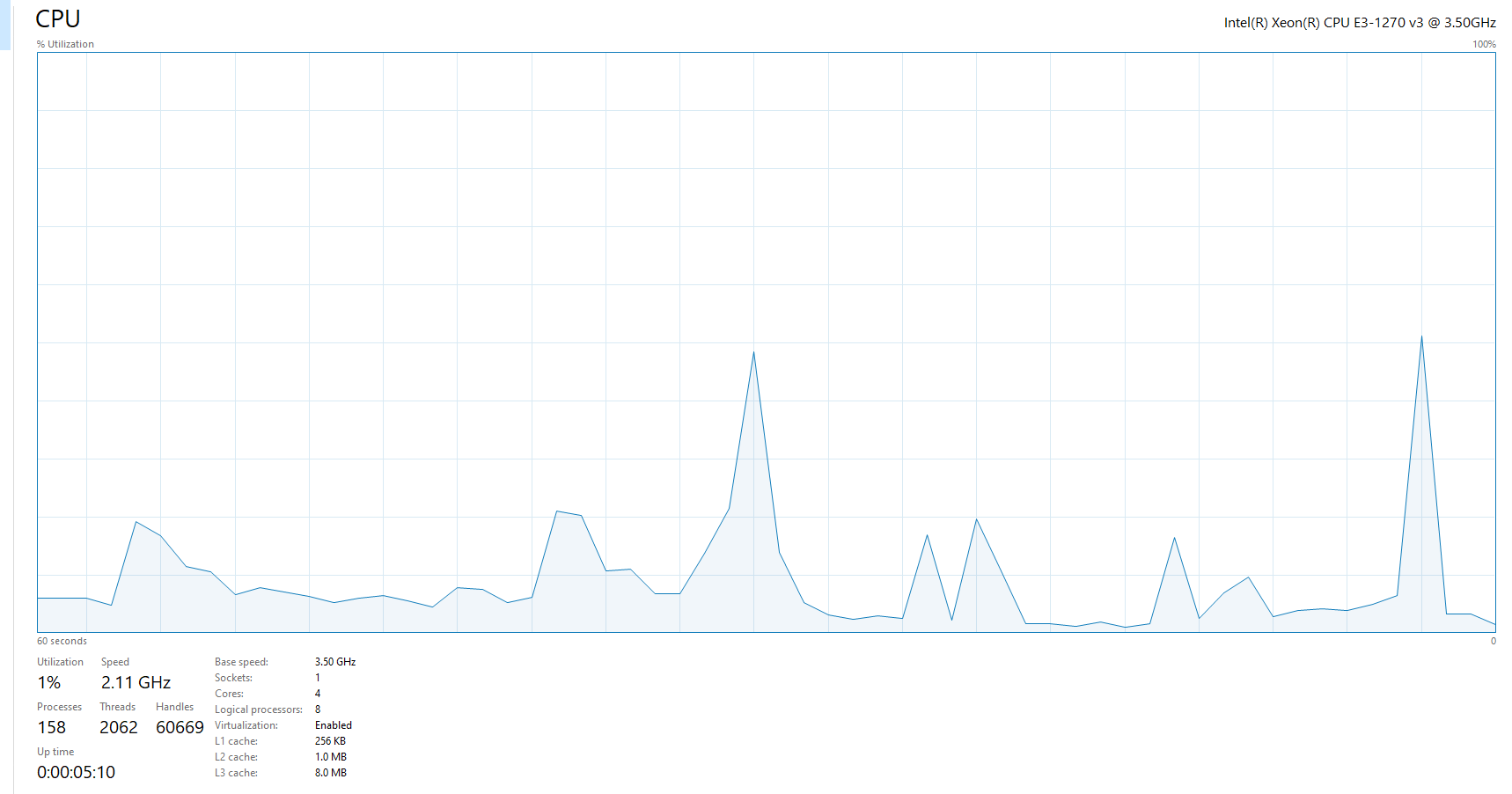
In my experience, the server performs stably under typical load. I usually run one host server instance at a time. CPU performance has been good overall, and I have not encountered any CPU-related issues. The main performance concern I noticed is GPU allocation and GPU memory usage, which often runs close to about 80%.
Even with this level of GPU usage, the server has remained stable. I have not experienced any crashes or situations that required a forced restart.
Network Performance
Ping Test

Speed Test
- Download speed: 94.18 Mbps
- Upload speed: 93.46 Mbps
The speeds are close to the maximum capacity of a 100 Mbps bandwidth, with utilization above 94%, which indicates that I am not experiencing any noticeable bandwidth throttling or network congestion.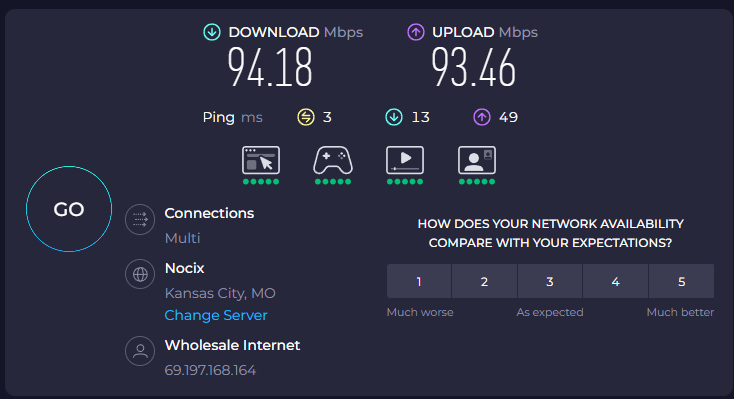
Application Performance Evidence
Reliability Evaluation
Based on my experience using the Lite GPU Dedicated Server (P600), the server has been very reliable. I have not experienced any crashes, forced restarts, or unexpected shutdowns during my usage. The system has remained stable while running a single host server instance, even under typical load.
Overall, the server maintains consistent uptime and responsiveness, and I have encountered no reliability-related issues. It performs as expected without interruptions, making it a dependable choice for hosting my applications.
Optimization Tips
In my usage of the Lite GPU Dedicated Server (P600), I did not make any specific adjustments or optimizations to improve performance. The server was stable and capable of running my single host instance without additional tuning.
The only advice I can offer is to verify GPU passthrough and confirm hardware limitations before purchase, as GPU allocation and memory usage were the main considerations during operation. Other than that, the default setup was sufficient for my workflow.
Conclusion & Recommendations
From my experience with the Lite GPU Dedicated Server (P600), I’d definitely recommend Database Mart. Their hosting is solid, and their support is amazing—they respond super fast no matter the time. The pricing is fair too, especially for what you get.
If you're planning to run GPU-heavy apps, just make sure to check the GPU passthrough and hardware limits before you buy, so you know what to expect. Other than that, it's really easy to set up and runs smoothly, making it a reliable choice for anyone who wants hassle-free GPU hosting.
Why Choose DBM?
I went with Database Mart because of their amazing support and fair pricing. They respond incredibly quickly at any time of day, and their hosting service is really reliable.
Deploy Your Own Version of This Use Case Now?
Lite GPU Dedicated Server - P600
- 16GB RAM
- GPU: Nvidia Quadro P600
- Quad-Core Xeon E3-1230
- 120GB + 960GB SSD
- 100Mbps-1Gbps
- OS: Windows / Linux
- Single GPU Specifications:
- Microarchitecture: Pascal
- CUDA Cores: 384
- GPU Memory: 2GB GDDR5
- FP32 Performance: 1.2 TFLOPS