


Customer Story: Powering Financial Independence with JX7 Neural Trading Engine on a 24/7 VPS
"I'm an individual trader working toward financial freedom through technology. Right now, I'm using Database Mart's Express Windows Server VPS, mainly to run my self-developed automated quantitative trading system 24/7. It hosts MetaTrader 5 and works together with my Python-based deep learning models in real time, continuously handling market analysis, model inference, and automated order execution in the background.
In the following sections, I'll share how this system is actually deployed on the VPS, how it performs in real-world conditions, and the optimization techniques I've applied to make everything run efficiently in a resource-limited environment."
Submitted by user "john***777@gmail.com"
Application Scenario
I use this server as the 24/7 "automated trading desk" for my JX7 Neural Trading Engine. It runs Windows Server 2022 continuously, with the main task being the real-time collaboration between MetaTrader 5 (MT5) and my Python deep learning models. MT5 provides stable market data and trade execution, while Python handles high-frequency data processing, feature engineering, and model inference. The system runs an event-driven automated loop—fetching the latest market data, calculating indicators, running inference, and sending trade orders instantly—allowing me to trade without being glued to the screen.
In practice, I usually run 1 MT5 instance and 2–3 Python processes (execution, logging, retraining) and rely on a self-written watchdog script to ensure the bot stays running and automatically restarts if it crashes. During high-volatility periods, maintaining low latency and stability is my top priority. Heavy training tasks are scheduled during low-volume hours to avoid impacting trade execution. The overall workflow centers on real-time inference, automated trading, and long-term stability, with server performance and reliability directly affecting strategy results and capital safety.
Server Specifications
✅ CPU: 2 vCPU Cores
✅ RAM: 4GB
✅ Storage: 60GB SSD
✅ Bandwidth: 100Mbps Unmetered
✅ Backup: Once per 4 Weeks
✅ IP Address: 1 Dedicated IP
✅ Operating System: Windows Server 2022
Deployment Process
Step 1. Python Environment
- Install Python 3.11 for speed improvements.
- Create Virtual Environment (venv) to manage dependencies.
- Batch Install Packages: Use
requirements.txt+ PowerShell script for all Python libraries:- MetaTrader5 (broker bridge)
- pandas (data processing)
- tensorflow / scikit-learn (ML logic)
- ta-lib (technical indicators)
Step 2. MetaTrader 5 Setup
- Install MT5 Terminal and log into broker account.
- Configure MT5 for VPS:
- Max Bars in Chart → 950 (save RAM)
- Disable News & Alerts → reduce CPU/bandwidth load
- Enable Automated Trading → for your EA
- Configure WebRequest → allow necessary API endpoints
Step 3. Bridging Python to MT5
- Verify MT5-Python connection using simple scripts (e.g.,
get_balance). - Clone the JX7 repository from GitHub.
- Set up the bot to run as a background service for continuous operation.
Step 4. Automation & Workflow
- Continuous Loop:
- Fetch tick-by-tick or OHLC data from MT5
- Normalize data and calculate indicators
- Feed into LSTM model for inference
- Execute trades if signal meets threshold
- Watchdog Script: Monitors bot every 60 seconds and restarts it if it crashes.
Step 5. Performance Tuning
- Set Python process priority to High in Task Manager.
- Disable unnecessary Windows services (e.g., Search indexing) to free up resources.
- Optimize ML retraining tasks to run during low-traffic hours to prevent CPU spikes.
- Use asynchronous Python architecture to separate trading, logging, and model retraining processes.
Step 6. Stability & Maintenance
- Ensure MT5 terminal launches on startup with credentials saved.
- Prevent Windows automatic updates/restarts to avoid mid-session interruptions.
- Regularly monitor server performance (CPU, RAM, Disk I/O) for bottlenecks.
Resource Utilization (Under Load)
- CPU: 24%~57%
- Memory: ~42%
Overall, the system load is very low. My trading program, MetaTrader 5, and Python models are running simultaneously, using less than half of the memory. This indicates that the Express Windows Server VPS has more than enough RAM, and the system is under no pressure.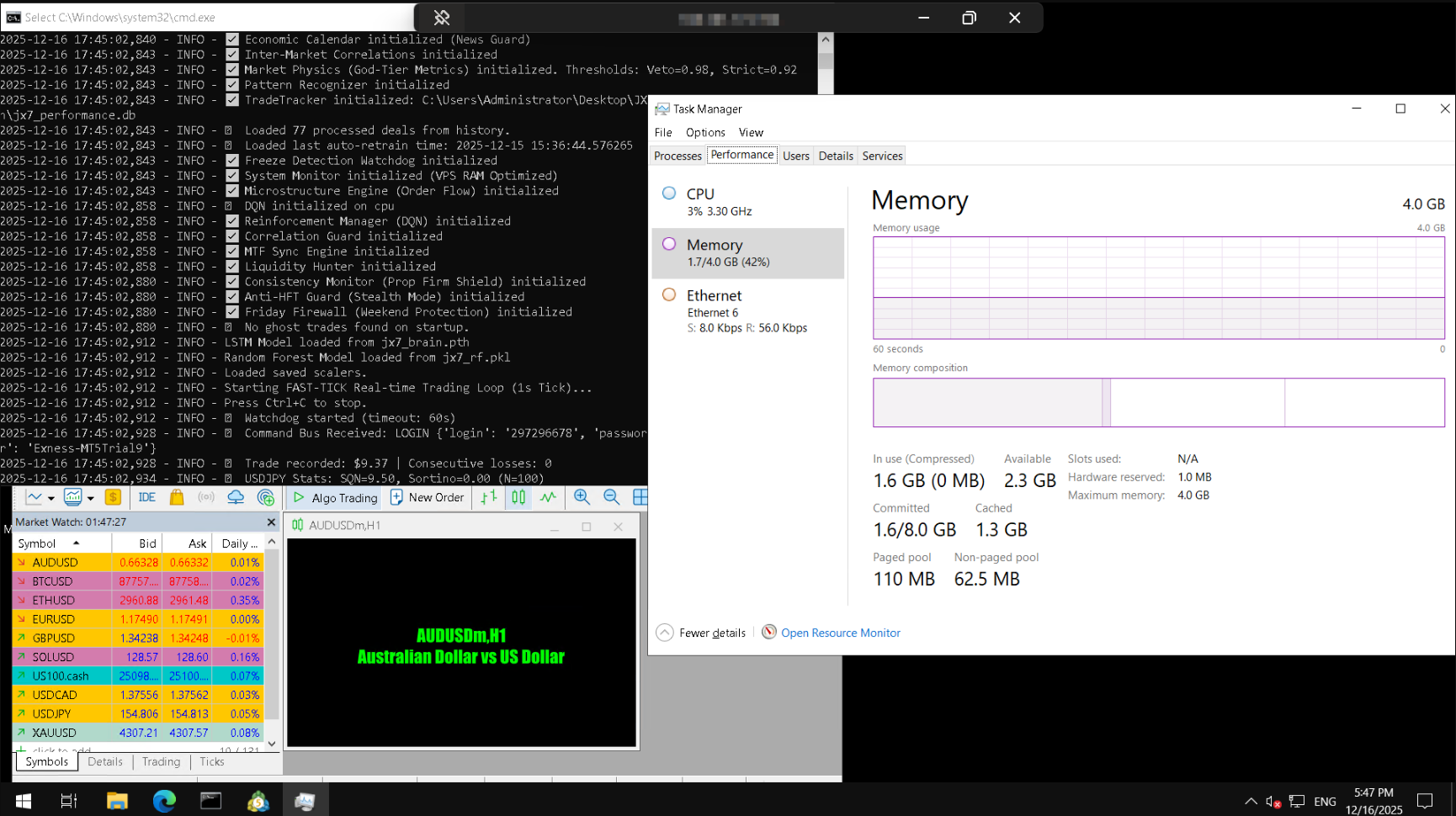
Performance Review
Workload: The system runs in an automated loop, continuously fetching tick data from the market and feeding it into the neural network for real-time inference, then automatically executing trades based on the predictions. The typical setup includes 1 MetaTrader 5 instance for market connection and order execution, plus 2–3 Python processes responsible for data processing, logging, and model training/updating. During periods of high market volatility, CPU and memory usage may temporarily spike, but the system remains stable.
CPU & Memory Usage: Under normal market conditions, the CPU averages around 24%~57% and memory around 42%, with overall system load remaining low. Even running MT5 and deep learning models simultaneously, the VPS has ample resources, with no significant performance bottlenecks or memory pressure.
System Stability: The server can run 24/7 continuously with minimal interruptions. By setting process priorities, using a watchdog monitoring script, and optimizing both MT5 and the Python environment, the trading system remains highly reliable. To date, the server has been running steadily for approximately 18 days without any major failures or crashes.
Network Performance
Ping Test
- Minimum ping: 2–3 ms, very fast
- Average ping: 13–19 ms, low network latency, suitable for real-time applications
- Jitter: 13–24 ms, slightly variable but generally stable
Overall network quality is excellent, with low latency and small median values, making it friendly for real-time financial trading operations. Occasional high-latency spikes may occur due to temporary internet routing fluctuations but do not affect overall performance.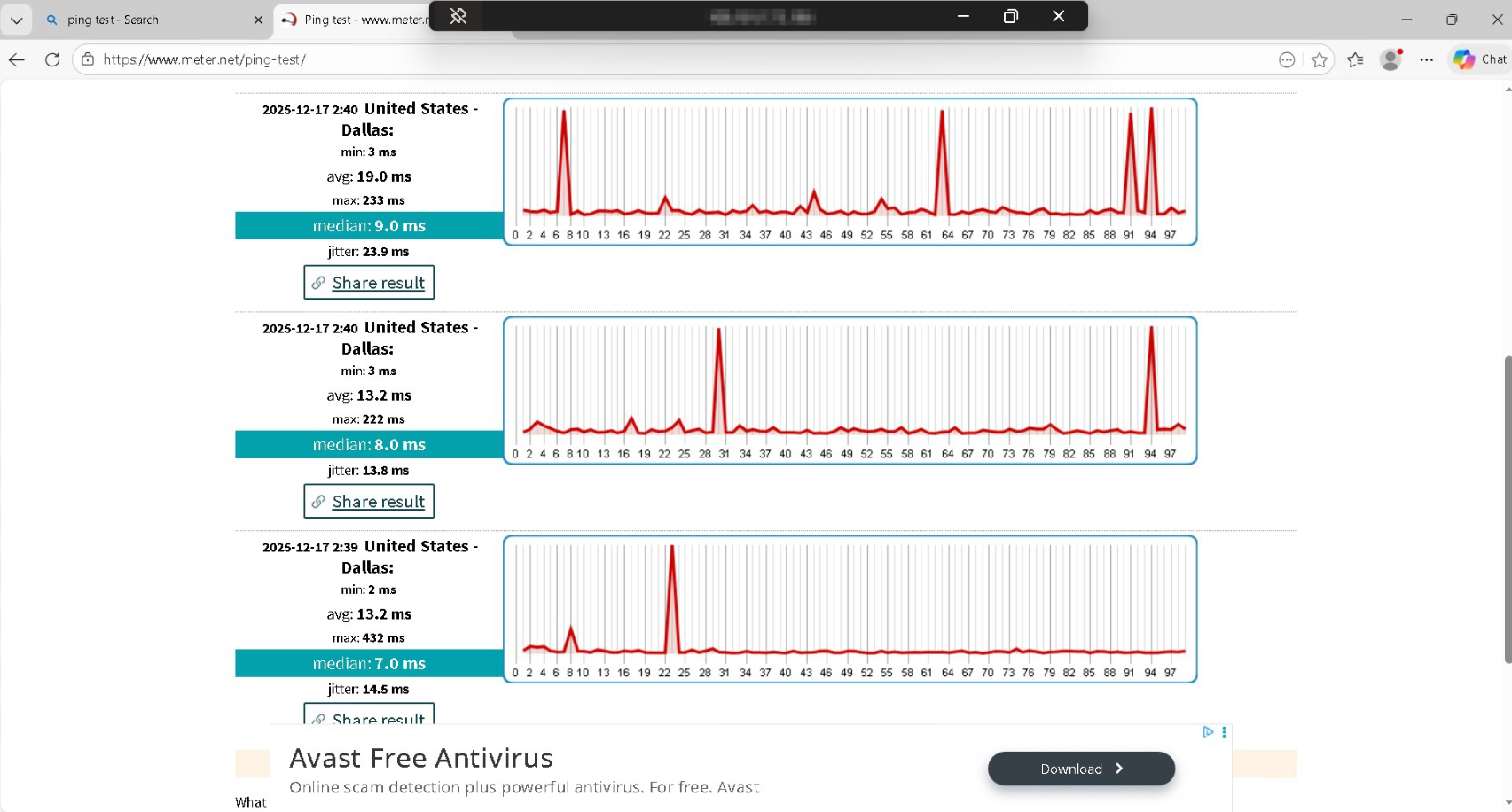
Speed Test
- Download: 497.26 Mbps
- Upload: 97.86 Mbps
Honestly, the speeds are fantastic. The high download rate makes grabbing market data super quick, and the upload speed ensures my trades go through instantly with minimal risk of slippage. For my high-frequency trading setup, this kind of stable, fast connection is exactly what I need to keep the bot running smoothly 24/7. No lag, no bottlenecks—just reliable performance that lets me focus on improving my trading engine rather than worrying about the network.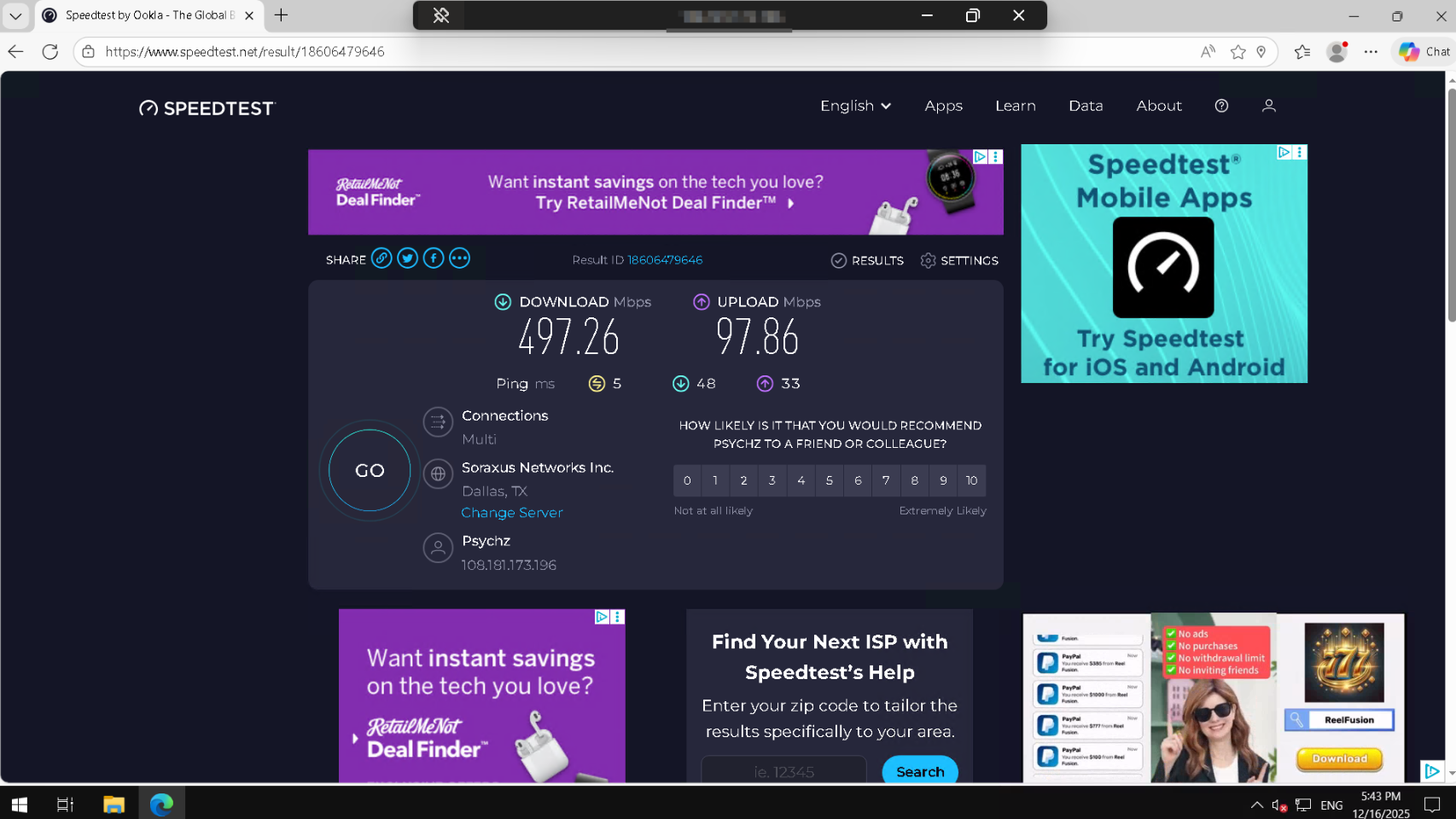
Application Performance Evidence
Reliability Evaluation
Overall, I'd say the server has been very reliable. I've been running my businesss on it continuously, and it's stayed online for about 18 days straight without major interruptions. That uptime is crucial for my high-frequency trading, because even a few seconds of downtime could mean missed opportunities or losses. Most of the time, the server handles multiple Python processes and the MT5 terminal without any stuttering.
There was one unexpected shutdown about an hour and a half ago, but incidents like that are rare. When it happened, I couldn't log in via Remote Desktop and had to reach out to support—but they were responsive, which made the process painless.
Optimization Tips
The biggest lesson I learned is that idle resources on a VPS aren't really idle; you have to fight for every CPU cycle. Early on, I hit a major usage limitation where my CPU would spike to 100% when the neural network tried to retrain on fresh data, which actually froze the MT5 terminal for a few seconds. In high-frequency trading, that latency is a disaster. This forced me to optimize aggressively. I couldn't just throw more hardware at it, so I rewrote my Python architecture to be asynchronous, strictly scheduling heavy training tasks for low-volume hours (like the Asian session).
Conclusion & Recommendations
I highly recommend Database Mart for anyone looking to run resource-intensive applications like the JX7 Neural Trading Engine. The VPS has proven extremely stable, reliable, and capable of handling 24/7 automated trading without interruptions. With fast connectivity, flexible resource allocation, and responsive support, it delivers enterprise-level performance at a price that makes sense for independent developers. For anyone serious about automated trading or machine learning workloads, Database Mart is an outstanding choice that I confidently endorse.
Why Choose DBM?
It was the price. Specifically the Black Friday deal I caught. I'm bootstrapping this project with my own money, so I can't afford to burn cash on overpriced instances from the big cloud giants. Although this VPS, located in Dallas, is far from my Broker's server (Exness) which is in Europe, I try my best to work with what I have. I needed good specifications to handle my machine learning workload, and getting those specs elsewhere would have cost me double or triple. Database Mart offered the raw power I needed at a price point that actually makes sense for an independent developer. It allows me to allocate my capital to my trading portfolio rather than wasting it on server overhead.