


Billing
Payment Methods
Database Mart currently supports the following four payment methods. You can choose the option that best fits your situation to pay your invoices:
- PayPal
- Credit Card
- Bank Account / ACH
- Wire Transfer
This article explains the definition, use cases, rules, subscription setup process, and common payment failure troubleshooting for each payment method.
1. Credit Card
Definition
Credit card is a widely accepted payment method that allows you to securely store your card details for one-click payments on future invoices.
Use Cases / Who It's For
- Customers who want to complete payments quickly without additional offline coordination
- Customers who need automatic monthly/periodic renewal billing and want to avoid manual payments
- Individual users or small-to-medium businesses paying regular subscription invoices
Rules
- When you add a credit card, the card is automatically set as the default payment method for all future purchases.
- The "Auto-pay" (automatic card charging) option is enabled by default when you save a new card. If you prefer to pay manually, please delete the card to prevent automatic charges.
- To subscribe to recurring billing, simply add your card and the system will charge it automatically on each renewal date.
How to Set Up a Subscription
- Log in to the Database Mart console and go to the Billing page.
- Select Payment Methods, then click Add Credit Card.

- Enter your card number, expiration date, CVV security code, billing address, and other required information, then save.
- Once saved, the card is automatically set as your default payment method with Auto-pay enabled by default. If you prefer to pay manually, please delete the card to prevent automatic charges.
Troubleshoot Payment Card Declines
Payment card declines may occasionally occur when making a payment to Database Mart. This guide explains the most common causes and provides steps to help you complete your payment successfully.
Common Causes of Payment Card Declines
| Failure Reason | Recommended Action |
|---|---|
| The card was declined for an unknown reason or Stripe Radar or Adaptive Acceptance blocked the payment. | Contact your card issuer for more information, or try another card. |
| The payment was declined because Stripe suspects that it's fraudulent. | Try another card or contact your card issuer to confirm the transaction. |
| The payment can't be authorized. | Try the payment again. If it still fails, contact your card issuer. |
| The card number / CVC number / expiration date / billing address / postal code is incorrect. | Check the card information (card number, CVC, expiration date, billing address, and postal code) and try the payment again. |
| The card has insufficient funds / exceeded balance, credit limit, or transaction amount limit available on their card. | Check the card balance or spending limit, or use another payment method. |
| The card has expired / the card or linked account is invalid. | Use a valid card or contact your card issuer to confirm the card status. |
| The card is restricted / reported lost or stolen. | Contact your card issuer to confirm the card status, or use another card. |
| The card doesn't support this type of purchase / currency / payment is not permitted. | Confirm that your card supports this transaction type or currency, or contact your card issuer for assistance. |
| The transaction was duplicated or the payment amount is invalid. | Check whether the payment has already been completed and confirm the payment amount is correct. |
| The PIN entered is incorrect / PIN verification is required / test card was used. | Enter the correct PIN or use a valid card to complete the payment. |
| The card was declined because the transaction requires authentication such as 3D Secure. | Complete the 3D Secure authentication and try the payment again. |
How to Resolve a Declined Credit Card Payment
If your credit card payment is declined, please follow the steps below:
Step 1: Check Your Card Information
Carefully check that the following information is correct:
- Card number
- Expiration date
- CVV/CVC security code
- Billing address
- Postal code
Any incorrect or mismatched information may cause the payment to be declined.
Step 2: Contact Your Card Issuer
Your card issuer can explain why your transaction was declined and help resolve any restrictions on your card. Payment processors don't share specific decline reasons due to privacy regulations, so your bank is the best source of information.
Common reasons include:
- The transaction was flagged for fraud and requires your confirmation.
- Your daily or international spending limit has been reached.
- International or online payments are not enabled on your card (Database Mart processes payments through Stripe/PayPal).
⚠️ Important: Avoid submitting multiple payment attempts within a short period. Repeated failed transactions may trigger payment security controls, temporarily blocking additional payment attempts for up to 24 hours.
Step 3: Try an Alternative Payment Method
If your card continues to be declined, you may:
- Use another credit or debit card from a different issuer.
- Change the payment method to PayPal.
- For payments over USD $100, contact our Billing team to arrange a bank transfer payment.
Prevent Future Payment Interruptions
To help avoid unexpected service interruptions:
- Enable Auto Pay to ensure invoices are paid automatically when due.
- Notify your bank before making large or international payments to help prevent fraud-related blocks.
2. PayPal
Definition
PayPal is an online payment gateway that lets you pay using your PayPal balance, bank account, or linked credit/debit cards, without sharing your financial details with us.
Use Cases / Who It's For
- Customers who already have a PayPal account and prefer managing payment methods through a third-party platform
- Customers who don't want to share their credit card details directly with the merchant
- Customers who want the flexibility to manage or cancel their subscription directly from their own PayPal account
Rules
- PayPal subscription (recurring billing) can only be created at the moment you pay an outstanding invoice – look for the "PayPal Subscription" option during checkout.
- After setting up a subscription, future invoices will be automatically charged via PayPal.
- You can cancel or modify your PayPal subscription directly from your PayPal account settings at any time.
- Please note that a PayPal subscription can only be created when you pay your invoices.
How to Set Up a Subscription
- On the Billing page, locate an outstanding invoice.
- Select PayPal as the payment method.
- On the checkout page, check the "PayPal Subscription" option.
- Click the PayPal button to be redirected to PayPal to complete login authorization and confirm payment.

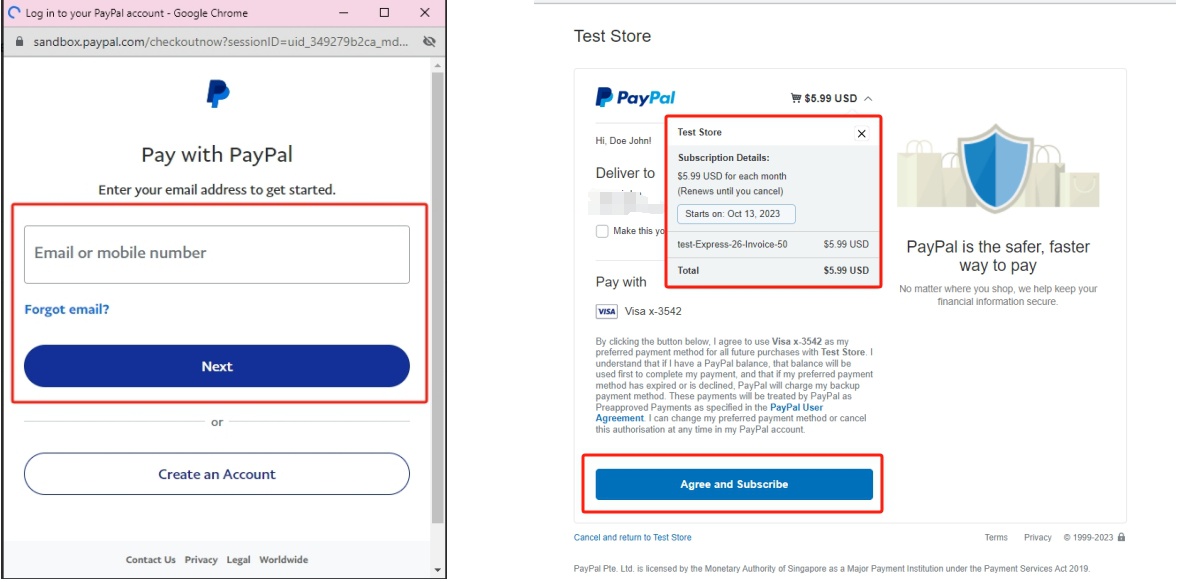
- Once payment is successful, the subscription is created, and future invoices will be automatically charged via PayPal.
PayPal Payment Failures: Common Causes and How to Resolve Them
Common Causes
| Failure Reason | Description |
|---|---|
| Payment declined by your card issuer or bank | To protect your privacy, your card issuer or bank doesn't tell PayPal the specific reason for the decline. |
| Card details are outdated | The expiration date or billing address associated with your credit or debit card doesn't match your bank's records. |
| PayPal account is limited | Unusual account activity has caused PayPal to temporarily restrict certain account functions. |
| Security check required | PayPal requires identity confirmation to verify it's really you using the account. |
| Email or bank account not confirmed | The email address linked to your PayPal account, or your linked bank account, hasn't been confirmed yet. |
| Insufficient funds | Your PayPal balance, linked bank account, or linked card doesn't have enough available funds to cover the payment. |
| Risk or fraud detection triggered | The transaction was flagged as unusual (e.g., due to amount, frequency, or region) and blocked by PayPal's risk system. |
PayPal/UPI Payment Pending for India Customers
If you have completed a PayPal/UPI payment but your DatabaseMart invoice is still showing as unpaid:
- Do not make another payment: Some PayPal/UPI payments from India may take 2–3 business days to be processed and reflected on the invoice.
- Contact us if needed: Please contact our billing team and provide your payment screenshot and transaction details. We will monitor the payment and, if needed, provide a few additional days for processing so your service remains active.
- Contact PayPal if still pending: If the payment is not reflected after a few business days, please contact PayPal to confirm its status and whether any further action is required.
⚠️Tip: Please keep your payment screenshot and transaction details in case further verification is needed.
How to Resolve It
- Verify your payment method details: Confirm that your linked credit card's expiration date and billing address are correct.
- Check your account status: Log in to your PayPal account and check for any restrictions, pending confirmations, or security prompts, and complete any required verification.
- Confirm sufficient balance: Make sure your PayPal balance, or the linked bank account/card, has enough funds to cover the payment.
- Contact your card issuer: If the payment was declined by your bank, PayPal cannot provide the specific reason — contact your card issuer directly for details.
- Try another payment method: If the issue persists, switch to a different card or bank account within PayPal.
- Contact PayPal Support: If none of the above resolves the issue, contact PayPal customer support directly for further troubleshooting.
💡 Tip: If a PayPal subscription payment fails, PayPal will typically retry the charge automatically 1–2 times over the following days. If it continues to fail, the subscription may be suspended, and you will need to update your payment method or contact the Database Mart Billing team to settle the outstanding invoice.
3. Bank Account / ACH
Definition
Bank Payment (ACH) is a bank-to-bank payment method that allows you to pay invoices directly from your US checking or savings account, typically at lower fees than credit cards.
Use Cases / Who It's For
- Customers with a US-based bank account and a US billing address
- Customers who want to reduce payment processing fees and don't mind completing a one-time verification step
- Businesses or individuals who need long-term, stable subscriptions and maintain sufficient account funds
Rules
- Bank payments are only supported for customers with a US-based bank account and a valid US billing address.
- To subscribe via Bank Payment, you must first add your bank account details and authorize a one-time micro-deposit verification – this is a one-time setup.
- After verification, you can enable recurring ACH debits for automatic invoice payments; please ensure sufficient funds are available on the due date.
- Bank Payments (ACH) are available for transactions of $100 or more.
- Earn 1% back in Account Credits on every successful ACH payment.
How to Set Up a Subscription
- Go to the Billing page and select Payment Methods.
- Click Add Bank Account and enter your US bank account details (account number, routing number, etc.) and billing address.

- Subscription is successfully set up after submitting bank card information.
Bank Payment (ACH) Failures: Common Causes and How to Resolve Them
If an ACH payment fails, the bank returns a standardized "Return Code" that explains the specific reason for the failure. Some of the more common scenarios are listed below.Common Causes
| Scenario | Description | Recommended Action |
|---|---|---|
| Insufficient funds | The account did not have enough available balance to cover the debit on the processing date. | Ensure sufficient funds are available on the due date; the system typically allows a limited number of retries within a set period. |
| Incorrect account information | The bank account number or routing number was entered incorrectly, or the account could not be located. | Double-check your bank account information and resubmit. |
| Account closed or invalid | The linked bank account has been closed or is otherwise invalid. | Update to a valid bank account, or switch to another payment method. |
| Authorization revoked | The customer notified their bank to revoke a previously granted debit authorization. | The customer must provide a new authorization, or use another payment method for this billing cycle. |
| Payment stopped | The customer requested a stop payment on a specific debit through their bank. | Confirm with the customer and obtain a new authorization before reattempting the debit. |
| Account frozen | The account has been frozen due to legal action or internal bank policy, and cannot process any transactions. | The customer should contact their bank for details, or switch to another payment method. |
Recommended Steps
- Verify your account details: Confirm that the bank account number and routing number you provided are correct.
- Ensure sufficient funds: Make sure your account has enough available balance before the due date to avoid a failed debit due to insufficient funds.
- Check the failure notification: If a debit fails, the system will typically indicate the specific reason within a few days — please review it promptly.
- Reauthorize or update account information: If the failure was due to a closed account or revoked authorization, you will need to provide valid bank account details and complete authorization again.
- Contact the Billing team: If repeated attempts still fail, please contact our Billing team for assistance, or switch to a credit card or PayPal.
⚠️ Because ACH transfers are not processed in real time, it typically takes 1–2 business days to confirm whether a debit succeeded. Please wait for the result notification rather than resubmitting the debit request repeatedly within a short period.
4. Wire Transfer
Definition
Wire Transfer is a cross-border, bank-to-bank fund transfer method, typically used for larger payment amounts or scenarios that require offline coordination.
Use Cases / Who It's For
- Enterprise customers making large payments, or who prefer to coordinate payment details offline with the Billing team
- International customers who are unable to pay via credit card, PayPal, or ACH
- Customers with larger invoice amounts (e.g., a single invoice exceeding USD $100)
Rules
- Wire Transfer is not available for self-service online payment. You need to contact the Database Mart Billing team to obtain the designated receiving bank account information.
- The transfer amount, expected arrival time, and invoice confirmation must all be coordinated offline with the Billing team.
- Because wire transfers involve cross-bank, cross-border clearing, arrival times can be longer than other methods — please coordinate with the Billing team in advance and allow sufficient time.
How to Pay by Wire Transfer
Wire Transfer does not support automatic recurring subscriptions. Each payment must be individually coordinated with the Billing team, following the process below:
- Contact the Database Mart Billing team via the ticketing system or email, specifying the invoice you intend to pay by wire transfer.
- The Billing team will provide the receiving bank account details and related remittance information.
- Initiate the wire transfer through your own bank.
- Once the transfer is complete, send the payment confirmation/receipt to the Billing team for verification.
- After the Billing team confirms receipt of funds, your invoice will be reconciled, and the corresponding service will be activated.
Wire Transfer Failures: Common Causes and How to Resolve Them
Because wire transfers involve multiple steps across banks and countries, they are relatively more prone to delays or failures.
Common Causes
| Scenario | Description |
|---|---|
| Incorrect beneficiary information | The beneficiary account number, SWIFT/BIC code, IBAN, or beneficiary name is incorrect or incomplete. |
| Intermediary/correspondent bank issues | Cross-border wire transfers typically pass through 1–3 intermediary banks, each conducting its own independent review; an error at any stage can cause delays or a return of funds. |
| Insufficient funds in the sender's account | The sending account does not have enough balance to cover the transfer amount plus applicable fees. |
| Compliance / anti-money-laundering review triggered | Due to a large amount, or a transfer involving a specific country or region, the bank's compliance and risk-control system flags the transfer for additional review. |
| Currency or destination country restricted | The receiving bank's country/region has business restrictions with the sending bank, or does not support the specified currency. |
| Beneficiary name does not match the account | The beneficiary name does not match the name registered on the receiving account. |
Recommended Steps
- Carefully verify beneficiary information: Before initiating a wire transfer, confirm the exact receiving account number, SWIFT code, and other details with the Database Mart Billing team — even a small error can cause the transfer to be returned.
- Keep the payment receipt: After the transfer is complete, keep the wire confirmation/receipt provided by your bank for future verification of the payment status.
- Allow for processing time: International wire transfers typically take 3–5 business days, and may take longer if multiple intermediary banks are involved — please plan accordingly.
- Cooperate with compliance reviews: If your bank requests additional documentation or information for compliance purposes, please provide it promptly to avoid delays.
- Request a wire trace: If the funds have not arrived after the expected timeframe, ask your sending bank to initiate a SWIFT trace (tracer) to track the transfer's status across the payment chain; this process may take several business days or longer.
- Contact the Billing team: If a wire transfer fails or is returned, please contact our Billing team promptly so we can verify the invoice status and help reschedule the payment.
💡 Tip: Once a wire transfer has been initiated, it typically cannot be canceled or modified instantly the way a credit card or PayPal payment can. Please carefully verify all details with the Billing team before executing the transfer.