


How to Install and Run ComfyUI on Ubuntu (Complete Linux Setup Guide)
ComfyUI provides a modular image generation workflow that enables flexible AI processing through a node-based interface. It is suitable for research, creative design, and AI engineering deployment.
This guide explains how to use the one-click deployment version of ComfyUI Linux provided by DBM in an Ubuntu 2.2 environment. It covers the complete steps, including installation paths, service management, model and custom node directories, web interface access, environment operations, and update and maintenance. This guide will help you quickly start and use ComfyUI to build efficient and visual Stable Diffusion workflows on GPU servers.
I. Environmental Information
- Application installation path:
/opt/ComfyUI/ - Virtual environment path:
/opt/anaconda3/envs/comfyenv/ - ComfyUI-Manager plugin path:
/opt/ComfyUI/custom_nodes/comfyui-manager/ - ComfyUI-Login plugin path:
/opt/ComfyUI/custom_nodes/ComfyUI-Login/ - Default port: 8188
- GPU requirement: NVIDIA A4000 and above
V. Accessing ComfyUI (Accessing the Web Interface)
Default access address
ComfyUI runs on port 8188 by default and can be accessed through a browser:
http://<your-server-ip>:8188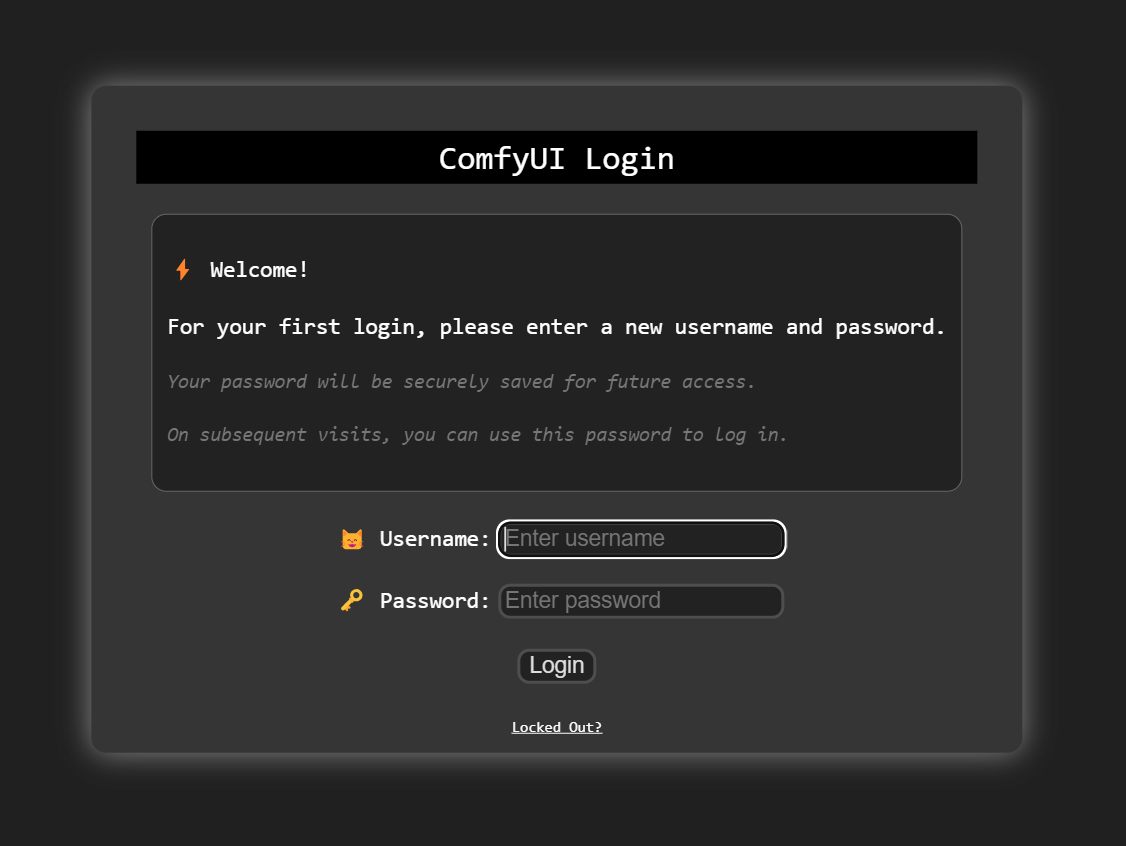
You can now fill in a username and password, but you need to save them for future logins; we will not save them in DBM control panel.
If you can't access the interface, check the service settings:
# Check if port 8188 is listening
netstat -atnplu | grep 8188

# Check the service status
systemctl status comfyui.service

# View service logs
journalctl -u comfyui.service -f

# Debug the program manually
source /opt/anaconda3/bin/activate comfyenv
cd /opt/ComfyUI
python /opt/ComfyUI/main.py
II. Startup and Operation
1. Start ComfyUI
sudo systemctl start comfyui.service2. Stop the Service
sudo systemctl stop comfyui.service3. Restart the Service
sudo systemctl restart comfyui.service4. Check the Running Status
sudo systemctl status comfyui.service5. View Logs (real time)
journalctl -u comfyui.service -fIII. Model and Node Directory Structure
/opt/ComfyUI/
├── models/               # Directory for various model files
│   ├── checkpoints/      # Main models (.ckpt / .safetensors) — Core Stable Diffusion base models
│   ├── vae/              # VAE models — Control color and detail decoding
│   ├── controlnet/       # ControlNet models — Enable pose, sketch, and depth–based conditional generation
│   ├── lora/             # LoRA models — Lightweight fine-tuning models for style or character customization
│   ├── upscalers/        # Upscaler models — Super-resolution for enhanced image clarity
│   ├── embeddings/       # Text embedding models — Improve prompt understanding and context
│   ├── text_encoders/    # Text encoder models — Convert textual prompts into latent-space features
│   ├── unet/             # UNet models — Core image denoising networks
│   ├── clip/             # CLIP text–image matching models — Maintain semantic consistency
│   ├── clip_vision/      # CLIP vision branch — Extract semantic features from images
│   ├── diffusers/        # Diffusion models — Modular subcomponents of Stable Diffusion
│   ├── diffusion_models/ # Legacy structure — Older diffusion model directory
│   ├── hypernetworks/    # Hypernetwork models — Provide fine-grained style adjustments
│   ├── gligen/           # GLIGEN models — Control image layout and spatial composition
│   ├── photomaker/       # PhotoMaker models — Enhance or replace portrait generation quality
│   ├── style_models/     # Style transfer models — Apply or convert artistic styles
│   ├── model_patches/    # Model patches or compatibility adapters
│   ├── configs/          # Model configuration files (e.g., scheduler or pipeline parameters)
│   └── vae_approx/       # Approximate VAE models — Faster inference with slight quality trade-offs
└── custom_nodes/         # User-defined nodes (extension modules for added functionality)
After downloading the model, put it in the corresponding directory, for example:
cd /opt/ComfyUI/models/checkpoints/
wget https://example.com/model.safetensors
Adding a custom node:
cd /opt/ComfyUI/custom_nodes/
git clone https://github.com/comfyanonymous/ComfyUI_examples.git
💡 After placing the custom node, please restart the ComfyUI service to take effect:
sudo systemctl restart comfyui.serviceIV. Environment Operations
- Enter the virtual environment
source /opt/anaconda3/bin/activate comfyenv- Manually run ComfyUI (for debugging)
cd /opt/ComfyUI
python /opt/ComfyUI/main.py- Check GPU status
nvidia-smiVI. Appendix
- Default Path Overview
/opt/
├── ComfyUI/                          # Main program directory (core ComfyUI runtime environment)
│   ├── alembic_db/                   # Database migration directory (stores and updates UI data)
│   ├── api_server/                   # Backend logic providing ComfyUI’s API services
│   ├── app/                          # Web front-end entry point (Flask/Gradio interface)
│   ├── comfy/                        # Core engine module (image generation, node computation, etc.)
│   ├── comfy_api/                    # API wrapper interfaces (for external systems or plugins)
│   ├── comfy_api_nodes/              # Node definitions corresponding to API modules
│   ├── comfy_config/                 # Global configuration files (port, paths, cache, etc.)
│   ├── comfy_execution/              # Node graph execution engine (workflow runtime logic)
│   ├── comfy_extras/                 # Extended features (extra nodes, experimental modules)
│   ├── custom_nodes/                 # User-defined nodes (third-party extensions)
│   ├── models/                       # Model directory (stores Stable Diffusion–related models)
│   │   ├── checkpoints/        # Main models (.ckpt / .safetensors)
│   │   ├── vae/                # VAE models (color and detail decoding)
│   │   ├── controlnet/         # ControlNet models (pose, depth, sketch control)
│   │   ├── lora/               # LoRA fine-tuning models (style or character-specific)
│   │   ├── upscalers/          # Upscaler models (super-resolution)
│   │   ├── embeddings/         # Text embedding models (prompt understanding enhancement)
│   │   ├── text_encoders/      # Text encoders (convert language into latent features)
│   │   ├── unet/               # Main UNet denoising network
│   │   ├── clip/               # CLIP models (text–image semantic alignment)
│   │   ├── clip_vision/        # CLIP vision branch (image feature extraction)
│   │   ├── diffusers/          # Diffusion models (diffusion process submodules)
│   │   ├── diffusion_models/   # Legacy directory (older diffusion model compatibility)
│   │   ├── hypernetworks/      # Hypernetwork models (fine-grained style control)
│   │   ├── gligen/             # GLIGEN models (layout-based image control)
│   │   ├── photomaker/         # Portrait enhancement models (PhotoMaker)
│   │   ├── style_models/       # Style transfer models (artistic style conversion)
│   │   ├── model_patches/      # Model patches and compatibility adapters
│   │   ├── configs/            # Model configuration files (pipeline, scheduler parameters, etc.)
│   │   └── vae_approx/         # Approximate VAE models (for faster inference)
│   ├── input/                        # Input directory (uploaded images or prompts)
│   ├── output/                       # Output directory (default save path for generated results)
│   ├── user/                         # User data directory (configs, cache, temp files)
│   ├── web/                          # Front-end static files (web UI)
│   ├── main.py                       # Main entry point of ComfyUI
│   ├── server.py                     # Backend entry point (API / WebSocket)
│   ├── execution.py                  # Workflow execution scheduler
│   ├── node_helpers.py               # Node helper utility functions
│   ├── nodes.py                      # Node definition file (built-in node collection)
│   ├── extra_model_paths.yaml.example# Example configuration file for custom model paths
│   ├── new_updater.py                # Update script for program upgrades
│   ├── comfyui_version.py            # Version information file
│   ├── requirements.txt              # Python dependency list
│   ├── pyproject.toml                # Project build configuration
│   ├── README.md                     # Official documentation
│   ├── tests/                        # Test cases directory
│   ├── tests-unit/                   # Unit tests directory
│   ├── utils/                        # Common utility modules
│   ├── protocol.py                   # Communication protocol definitions (e.g., WebSocket message formats)
│   ├── cuda_malloc.py                # GPU memory allocation helper
│   ├── latent_preview.py             # Latent space preview generator
│   ├── hook_breaker_ac10a0.py        # Debug hook controller module
│   ├── folder_paths.py               # File path management module
│   ├── CONTRIBUTING.md               # Contribution guidelines
│   ├── CODEOWNERS                    # Repository maintainers configuration
│   ├── LICENSE                       # Software license
│   ├── pytest.ini                    # pytest configuration file
│   └── __pycache__/                  # Python bytecode cache directory
└── anaconda3/
    └── envs/
└── comfyenv/ # Python virtual environment (dedicated for ComfyUI runtime)- System service file example (for reference)
path: /etc/systemd/system/comfyui.service
[Unit]
Description=ComfyUI Service
After=network.target

[Service]
Type=simple
User=root
WorkingDirectory=/opt/ComfyUI
ExecStart=/opt/anaconda3/envs/comfyenv/bin/python /opt/ComfyUI/main.py --listen 0.0.0.0 --port 8188
Restart=always
RestartSec=5

[Install]
WantedBy=multi-user.target
VII. Conclusion
By following this guide, you can quickly install and start using ComfyUI on Ubuntu 22 to build efficient and visual Stable Diffusion workflows.
With the structured model directories, customizable nodes, and Linux service management commands, ComfyUI runs smoothly in both desktop and GPU server environments.
Whether you’re hosting locally or deploying on a cloud-based GPU instance, this setup ensures stability, flexibility, and full control over your AI image generation pipeline.
For advanced users, you can further extend ComfyUI with custom nodes, integrate additional models, or automate workflow execution to match your creative or production needs.
Document Version: v1.0
Applicable Products: Database Mart ComfyUI Hosting
Updated: October 21, 2025
install comfyui, run comfyui, comfyui ubuntu, comfyui linux setup, comfyui ubuntu installation, comfyui