


How to Enable RDP Shadow Mode in Windows
This is useful for technical support, user assistance, or monitoring active sessions in Windows environments.
What Is Remote Desktop Shadowing?
Shadow session mode lets an administrator:
- View the user’s desktop in real time.
- Control the desktop (with permission) to assist.
- Manage multiple RDP shadow sessions from one console.
Supported in Windows Server 2016, 2019, 2022, and 2025.
Not supported in Windows Server 2012 due to RDP architecture changes.
Prerequisites Before Enabling Shadow RDP
Before you set up RDP shadow mode:
- Enable multiple RDP sessions on your Windows Server. See: [Enable Multiple RDP Sessions Guide]
- Ensure you have Administrator privileges.
- Confirm the target session is active (you can’t shadow a disconnected or idle session).
Steps to Enable RDP Shadowing
Step 1: Enable RDP Shadow via Group Policy
- Press Windows + R, type
gpedit.msc, and press Enter. - Navigate to:
Computer Configuration > Administrative Templates > Windows Components > Remote Desktop Services > Remote Desktop Session Host > Connections > Set rules for remote control of Remote Desktop Services user sessions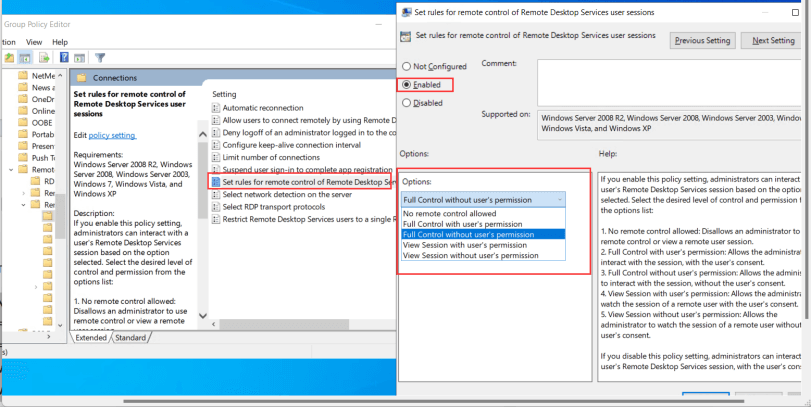
- Choose one of the following:
- Full control without the user’s permission
- Full control with the user’s permission
- Click Apply.
Step 2: Enable RDP Shadow in Firewall
If your firewall blocks shadow connections:
- Open Windows Defender Firewall with Advanced Security.
- Click Inbound Rules.
- Ensure the rule for Remote Desktop Services (Shadow) is enabled.

Step 3: Identify RDP Session to Shadow
Open PowerShell or Command Prompt and run:
qwinstaThis lists:
- Usernames
- Session IDs
- Connection status
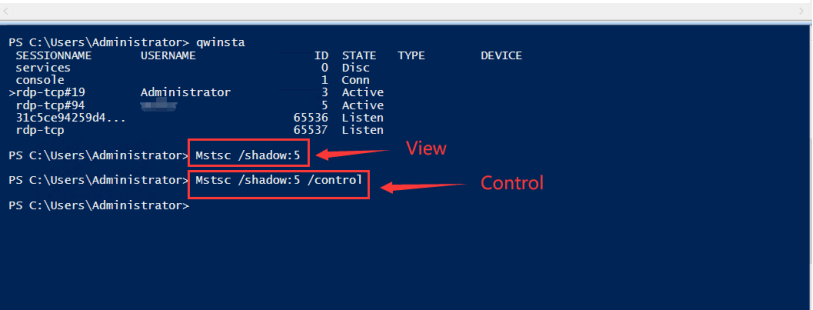
Step 4: Start Shadowing an RDP Session
- View Only
mstsc /shadow:<SessionID>- View & Control
mstsc /shadow:<SessionID> /controlReplace 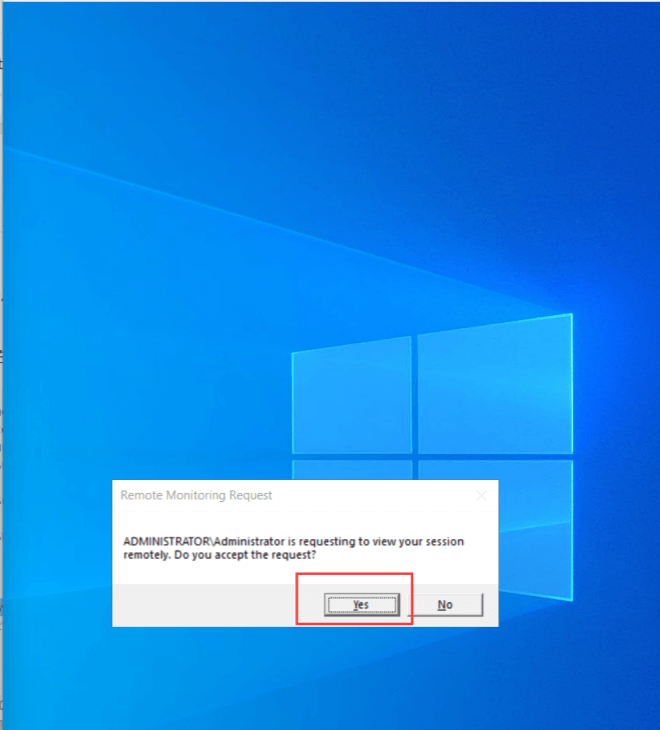
Notes for Using Shadow Remote Desktop
- Only the user with administrator permission can connect to other users’ shadow sessions.
- The shadow session must be active. If it’s disconnected or inactive, it cannot be connected.
- Please remember to enable multiple sessions.
remote desktop shadowing, shadow rdp, rdp session shadowing, remote desktop shadow session, remote shadowing, rdp shadow mode, shadow session rdp, rdp shadow Windows, remote desktop services shadow, rdp shadow session Windows, shadow a remote desktop session, shadow rdp session server 2016, shadow rdp session server 2019, shadow rdp session Windows 2022, remote desktop shadowing Windows 2025, shadow remote desktop session server 2012, shadow remote desktop session server 2016, shadow remote desktop session server 2019, shadow remote desktop session Windows