


FTP Issues Fix: 530 Login Authentication Failed
Introduction
If you are trying to connect to your FTP server but keep seeing the error:
530 Login authentication failedDon’t worry—this is one of the most common FTP issues. In this guide, we’ll explain why this FTP problem happens and how to solve it step by step, even if you’re a beginner.
What Does “530 Login Authentication Failed FTP” Mean?
This error usually appears when the FTP server cannot verify your username or password. The FTP client will return a message like:
Response: 530 Login authentication failedIt’s a clear sign of an FTP server troubleshooting problem related to authentication.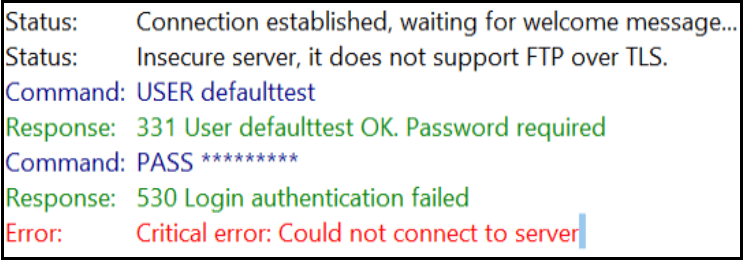
Possible Reasons for 530 Authentication Failed
There are a few common causes of the 530 authentication failed error:
- Wrong login details – username or password is incorrect.
- SQL not called properly – FTP server cannot read login data from SQL.
- SQL configuration mismatch – settings in Pure-FTP config files don’t match your database settings.
Step-by-Step Guide to Fix FTP Issues
Follow these steps to fix the response 530 login authentication failed error.
Step 1: Check Your FTP Login Details
If you created your FTP account via a control panel like ISPConfig or cPanel, your account name may not be exactly what you typed.
Example:
- You created an account
testin ISPConfig. - The actual login account is
defaulttest.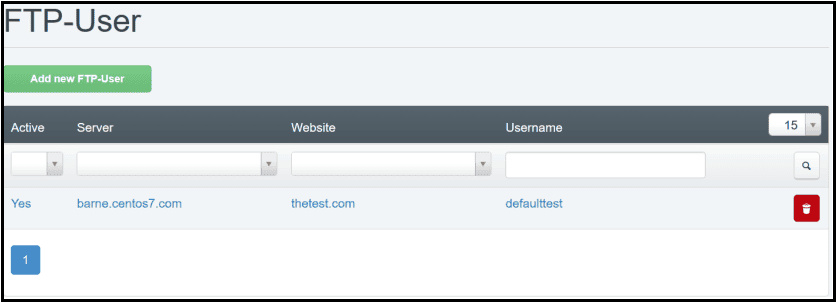
Try logging in again with the correct details. If the problem continues, move to Step 2.
Step 2: Check if Pure-FTP is Calling SQL
Pure-FTP stores account information in SQL. If SQL is not properly called, the login will fail.
Open the configuration file:
vi /etc/pure-ftpd/pure-ftpd.conf
If your server uses ISPConfig, the FTP accounts are stored in MySQL.
- If SQL is not being called → enable SQL in the config file.
- Restart Pure-FTP service after changes:
systemctl restart pure-ftpd.service
Step 3: Verify SQL Configuration
If SQL is being called but you still see 530 login authentication failed ftp, the issue may be a configuration mismatch.
Check your MySQL settings in the config file:
vi /etc/pure-ftpd/pureftpd-mysql.conf
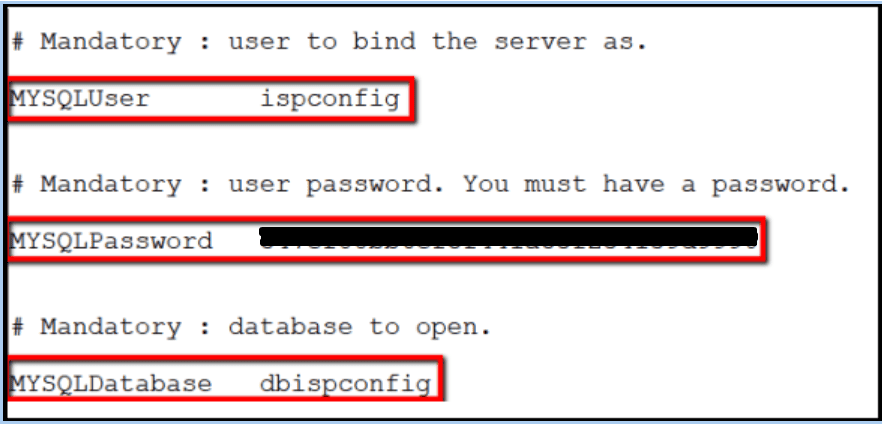
If you installed Pure-FTP with ISPConfig:
MYSQLDatabaseshould be dbispconfigMYSQLUsershould be ispconfig
You can find the correct MySQL password in:
vi /usr/local/ispconfig/interface/lib/config.inc.phpMake sure these match your Pure-FTP config. Then restart the FTP service:
systemctl restart pure-ftpd.serviceSecurity Best Practices
- Enable FTPS (FTP over TLS) to avoid plain-text password transmission, which is a common source of FTP issues.
- Use strong passwords and update them regularly to reduce the chance of 530 login authentication failed errors.
- Configure Fail2Ban to block brute-force attacks, helping prevent recurring FTP problems.
- If possible, prefer SFTP (SSH File Transfer Protocol) over FTP for more secure connections and to minimize ftp server troubleshooting cases.
Prevention Tips
- Before migrating servers, always back up and verify FTP configuration files. This helps you avoid unexpected ftp errors after deployment.
- After changing a password, immediately update your FTP client settings to prevent 530 authentication failed or response 530 login authentication failed messages.
- Use a consistent account naming convention to reduce confusion and make ftp problem resolution easier.
Conclusion
The “530 login authentication failed” FTP error is usually caused by wrong login details, a missing SQL connection, or misconfigured SQL settings.
By carefully checking your login info and verifying SQL configurations, you can quickly fix this FTP problem and get your FTP server running again.
ftp error, ftp issues, ftp problem, ftp server troubleshooting, 530 login authentication failed, 530 login authentication failed ftp, 530 authentication failed, response 530 login authentication failed