


How to Fix MailEnable 'Unknown or Disabled User' Error
Introduction
If you are running MailEnable on your Windows server and encounter the "Unknown or Disabled User" error during login, it usually means the MailEnable service is not properly authenticated with Windows policies.
This guide will show you how to fix the issue step by step, even if you are new to Windows server administration.
MailEnable "Unknown or Disabled User" Causes
- Misconfigured Windows Group Policy
- Missing permissions for the administrator account
- MailEnable services are not restarted after configuration changes
- IIS is not refreshed after updates
Steps to Solve MailEnable Login Issues
Step 1: Update Group Policy Settings
The most common solution for fixing MailEnable login issues is adjusting the Windows Group Policy to allow administrator rights.
1.1 Open Group Policy Editor
- Press
Win + R, typegpedit.msc, and press Enter. - In the Local Group Policy Editor, navigate to:
Computer Configuration > Windows Settings > Security Settings > Local Policies > User Rights Assignment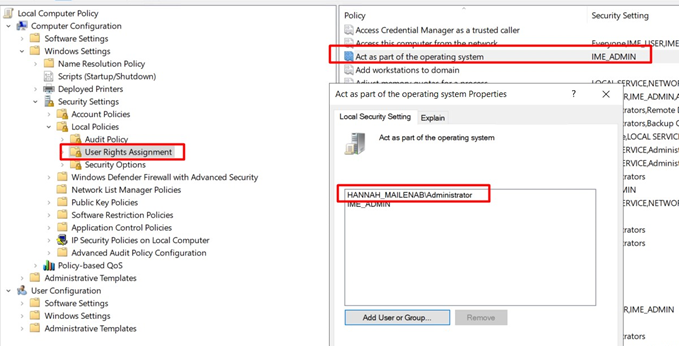
1.2 Edit the Policy
- In the right-hand pane, find the policy called: Act as part of the operating system
- Right-click it and select Properties.
1.3 Add the Administrator Account
- Click the Add User or Group button.
- Enter administrator (or the account used for MailEnable services).
- Click OK to save changes.
Step 2: Restart IIS and MailEnable
After updating the policy, you need to restart services so that the changes take effect.
2.1 Restart IIS
Open Command Prompt as Administrator and run:
iisresetThis will restart IIS (Internet Information Services), which is required for MailEnable login to function properly.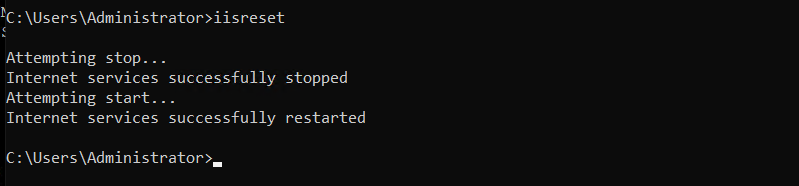
2.2 Restart MailEnable Services
- Press
Win + R, typeservices.msc, and press Enter. - Locate MailEnable SMTP, MailEnable POP, and MailEnable IMAP.
- Right-click each service and select Restart.
Step 3: Verify MailEnable Login
Now, try logging into your MailEnable account again:
- If the login works, the "Unknown or Disabled User" issue is resolved.
- If the error persists, double-check that the administrator account was correctly added in Group Policy.
Conclusion
By following this guide, you have:
- Updated Group Policy to grant administrator rights
- Restarted IIS using
iisreset - Restarted MailEnable services
This resolves the MailEnable "Unknown or Disabled User" error and ensures smooth MailEnable login for your users.
mailenable, iis restart, mail enable login