


How to Fix Problems with the Sudo Command in Ubuntu
Introduction
In Ubuntu and most Linux systems, the sudo command is one of the most important tools. It allows normal users to run commands with administrative (root) privileges.
However, sometimes the sudo command in Ubuntu stops working due to file permission errors or misconfiguration. If this happens, you might see error messages such as:
- sudo: /usr/bin/sudo must be owned by uid 0
- sudo: error in /etc/sudo.conf
- sudo: /etc/sudoers.d is world writeable
Don’t worry — this guide will walk you through how to fix these common Linux sudo command problems step by step.
Solutions to Fix Sudo Command Errors
1. Incorrect File Ownership or Permissions
- Error Message
sudo: /usr/bin/sudo must be owned by uid 0 and have the setuid bit set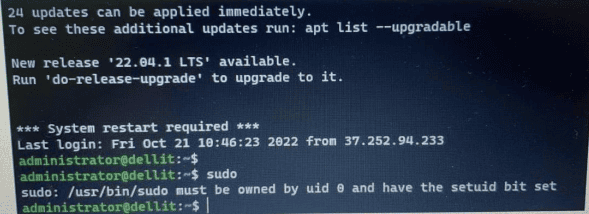
This happens when the /usr/bin/sudo file or the sudoers configuration has the wrong permissions. Ubuntu requires these files to be owned by root with strict security settings.
- Solution
Run the following commands to fix file permissions:
chmod 440 /etc/sudoers
chmod 775 /etc/sudoers.d
2. Wrong File Permissions or Ownership on Sudo Files
- Error Message
sudo: error in /etc/sudo.conf, line 0 while loading plugin ‘sudoers_policy’
sudo: /usr/lib/sudo/sudoers.so must only be writable by owner
sudo: fatal error, unable to load plugins
This issue usually means that some sudo system files were modified or their permissions changed incorrectly, preventing the Linux sudo command from loading plugins.
- Solution
Reset ownership and permissions with:
chmod 440 /etc/sudoers.d/README
chown root:root /usr/bin/sudo
chmod 4755 /usr/bin/sudo
Be careful to type sudo correctly (not sud).
3. Sudoers Directory Permissions Are Too Open
- Error Message
sudo: /etc/sudoers.d is world writeableThis error appears when the /etc/sudoers.d directory has permissions that are too broad, making it insecure for sudo in Ubuntu.
- Solution 1 (Using pkexec)
If you still have pkexec available, run:
pkexec chmod 0755 /etc/sudoers.d/
- Solution 2 (Recovery Mode)
If pkexec doesn’t work, you can fix it from Recovery Mode:
- Reboot the server.
- Hold Esc to enter Advanced Options.
- Select Recovery Mode for your current kernel.
- Enter root shell prompt.
- Run:
chmod 0440 /etc/sudoersConclusion
The sudo command Ubuntu is essential for system administration, but sometimes permissions get corrupted.
By following this guide, you now know how to fix:
- sudo must be owned by uid 0 error
- sudoers_policy plugin error
- sudoers.d is world writeable error
This ensures your Linux sudo command works properly again.
Once fixed, you can continue using commands like:
sudo su
sudo apt update
to manage and update your Ubuntu system safely.
sudo command ubuntu, sudo, sudo command, linux sudo, linux sudo command, sudo in ubuntu, linux sudo su, sudo update ubuntu