


How to Setup FTPS Server on CentOS 7
Introduction
FTP is a widely used protocol for transferring files, but it is insecure by default. To protect against man-in-the-middle attacks, we can add TLS/SSL encryption and convert FTP into FTPS (also called FTPES or FTP-SSL).
In this guide, you’ll learn how to set up an FTPS server on CentOS 7 using Pure-FTPd, generate SSL certificates, and configure TLS properly.
Easy Steps to Set Up FTPS Server
Step 1: Configure Pure-FTPd for FTPS
First, open the Pure-FTPd configuration file:
vi /etc/pure-ftpd.conf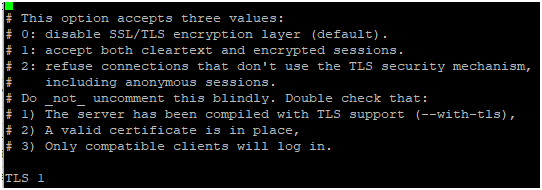
Now update the TLS settings:TLS=0 → Disable TLS (plain FTP only, not recommended).TLS=1 → Allow both FTP and FTPS connections.TLS=2 → Force FTPS only (most secure option).
For a secure setup, it’s best to set TLS to 2. Make sure to uncomment the TLS-related lines, then save the file.
Step 2: Create an SSL Certificate for FTPS
FTPS requires a valid SSL certificate. Let’s generate one.
2.1 Create a Directory for SSL Certificate
mkdir -p /etc/ssl/private/2.2 Generate SSL Certificate
Run the following command:
openssl req -x509 -nodes -days 7300 -newkey rsa:2048 \
-keyout /etc/ssl/private/pure-ftpd.pem \
-out /etc/ssl/private/pure-ftpd.pem
You’ll be asked to provide details:
- Country Name → e.g.,
USorDE - State/Province → Your state name
- City → Your city
- Organization Name → Your company or project
- Organizational Unit → e.g.,
IT Department - Common Name → Your server’s FQDN (e.g.,
ftp.example.com) - Email Address → Admin email
2.3 Secure the Certificate
Set correct permissions:
chmod 600 /etc/ssl/private/pure-ftpd.pemStep 3: Restart Pure-FTPd Service
Once the certificate is created and the config updated, restart the FTP service:
systemctl restart pure-ftpd.serviceStep 4: Test Your FTPS Setup
Now your CentOS FTPS server is ready! You can test it using an FTP client like FileZilla:
- Host → Your server IP or domain (e.g.,
ftp.example.com) - Port →
21 - Encryption → Require explicit FTP over TLS
- Username/Password → Your FTP account
If everything is correct, you should now connect securely using FTPS.
Conclusion
Congratulations! You have successfully completed your FTPS setup on CentOS 7. We covered how to:
- Configure Pure-FTPd for TLS/SSL
- Generate and secure SSL certificates
- Restart the FTPS service
- Test your CentOS FTPS server
With this configuration, your FTP sessions are encrypted, protecting your data from attacks.
setup ftps server, centos ftps server, configure ftps, ftps setup, setting up ftps