


Customer Story: Running MetaTrader 5 Forex Robots Reliably on Express Windows Desktop VPS
"I use a Windows Desktop VPS to run MetaTrader 5 for my Forex trading. I chose Database Mart's Express Windows Desktop VPS mainly because of its affordable Windows pricing, as other providers charge much more for similar resources. The setup was easy, and the VPS has met my needs well.
In the following sections, I'd like to share my experience and feedback, which may help others who are looking for a reliable and cost-effective VPS for MT5 Forex trading."
Submitted by user "juanp***o@hotmail.com"
Application Scenario
I use Database Mart's Express Windows Desktop VPS for Forex trading. The VPS runs Windows and is mainly used to install and run the MetaTrader 5 platform for my Forex robots, which execute automated trading strategies.
Server Specifications
✅ CPU: 2 vCPU Cores
✅ RAM: 4GB
✅ Storage: 60GB SSD
✅ Bandwidth: 100Mbps Unmetered
✅ Backup: Once per 4 Weeks
✅ IP Address: Default Shared IP
✅ Operating System: Windows
Deployment Process
Step 1: VPS Purchase and Access Setup
I purchased the Express Windows Desktop VPS from Database Mart. After the order was completed, I received the server IP address, username, and password, which allowed me to access the VPS remotely.Step 2: Remote Connection Configuration
I used RDP on my local computer to configure a remote desktop connection and successfully logged into the Windows Desktop VPS using the provided credentials.Step 3: MetaTrader 5 Installation
After logging in, I downloaded MetaTrader 5 (MT5) from the official website and installed it on the VPS using the default settings. No additional drivers or dependencies were required.Step 4: Forex Robot Deployment and Configuration
Once MT5 was installed, I logged into my trading account, uploaded my Forex trading robots (Expert Advisors), and configured them according to my trading strategy.Step 5: Continuous Operation and Monitoring
I kept MT5 running continuously on the VPS to enable 24/7 automated trading. The server has remained stable under normal operation without crashes or performance issues.
Performance Review
Responsiveness and Performance:
The VPS runs my MetaTrader 5 instance smoothly at all times. Even under continuous operation, I experience no lag, stuttering, or unexpected behavior, which ensures that my automated trading robots execute trades efficiently.System Stability:
The server maintains stable operation without requiring frequent reboots or manual intervention. I can leave MT5 running 24/7 without worrying about interruptions or performance drops.Reliability Over Time:
My VPS has been running continuously for about a week. During this time, there have been no crashes, forced restarts, or degradation in performance, demonstrating the reliability of the hosting environment.Suitability for Forex Trading:
The combination of high performance, stability, and long-term reliability makes the VPS fully suitable for Forex trading. It provides a dependable environment for running automated trading strategies around the clock.
Network Performance
Ping Test
The VPS server exhibits low latency, ensuring rapid communication between the VPS and trading servers. This provides a responsive experience when executing trades and updating market data.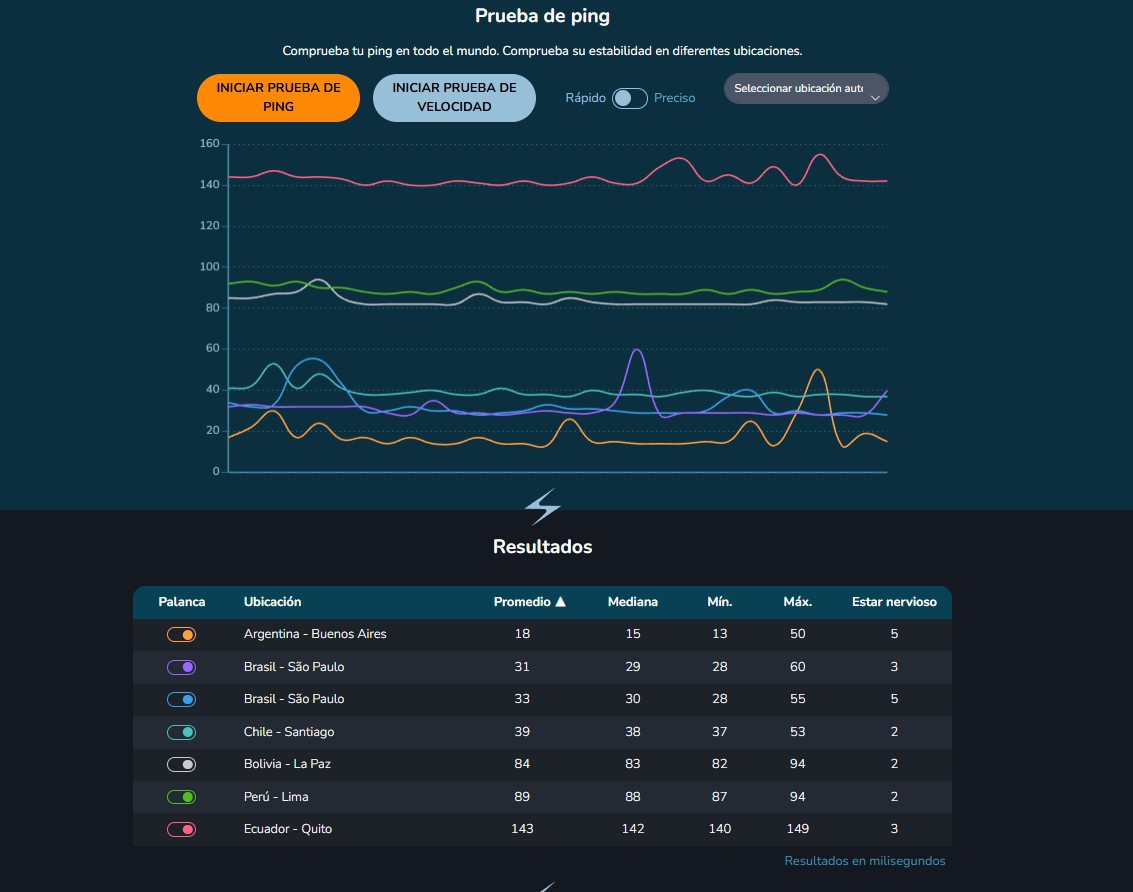
Speed Test
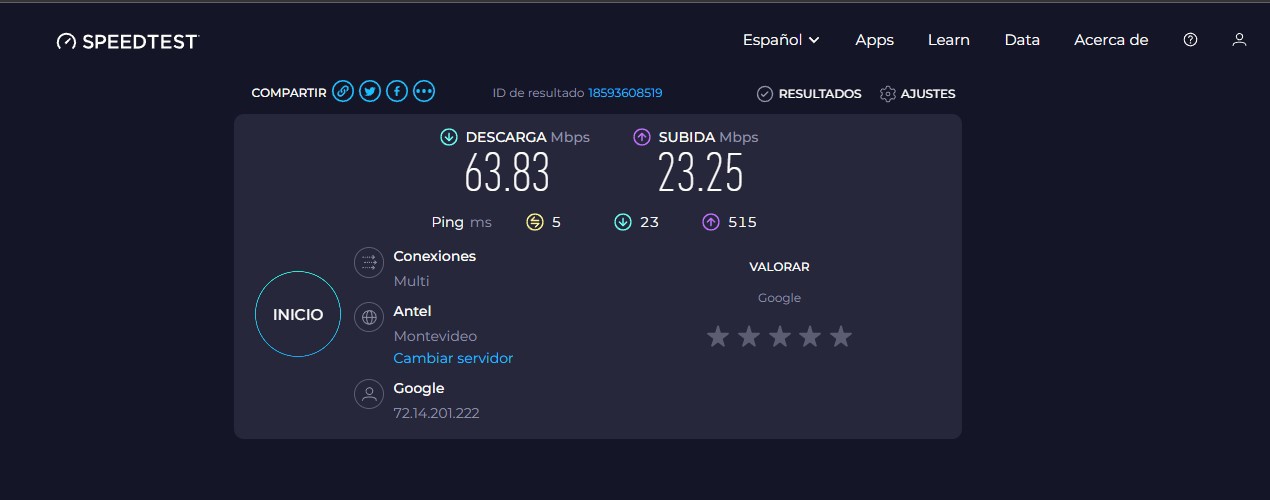
- Download Speed: 63.83 Mbps – More than sufficient to guarantee instant loading and updating of the MT5 platform, historical data, and news feeds. Even when handling multiple charts and instruments simultaneously, performance remains smooth and uninterrupted.
- Upload Speed: 23.25 Mbps – Enables rapid transmission of trading orders, ensuring trades are executed promptly without any delays.
Reliability Evaluation
System Stability
My Windows Desktop VPS runs continuously and reliably under normal usage. I only run one instance of MetaTrader 5, and it has been responsive at all times without stuttering or lag.Availability
The VPS has maintained continuous uptime for about a week. No downtime has been experienced during this period.Performance Consistency
No resource bottlenecks have been observed. The server handles the single MT5 instance without any issues, maintaining smooth operation throughout.Environment Adaptability
The VPS environment is fully compatible with MetaTrader 5, requiring no additional drivers or dependencies. Remote access through RDP is seamless and stable.
Resource Utilization (Under Load)
- CPU: 5%
- Memory: 52%
- Disk: 1%
When I run a single MetaTrader 5 instance, my VPS maintains very healthy resource usage: CPU is around 5%, memory at 52%, and disk usage at 1%. Under these conditions, the system runs smoothly and efficiently with no lag or performance issues, giving me ample headroom for stable operation and potential future tasks.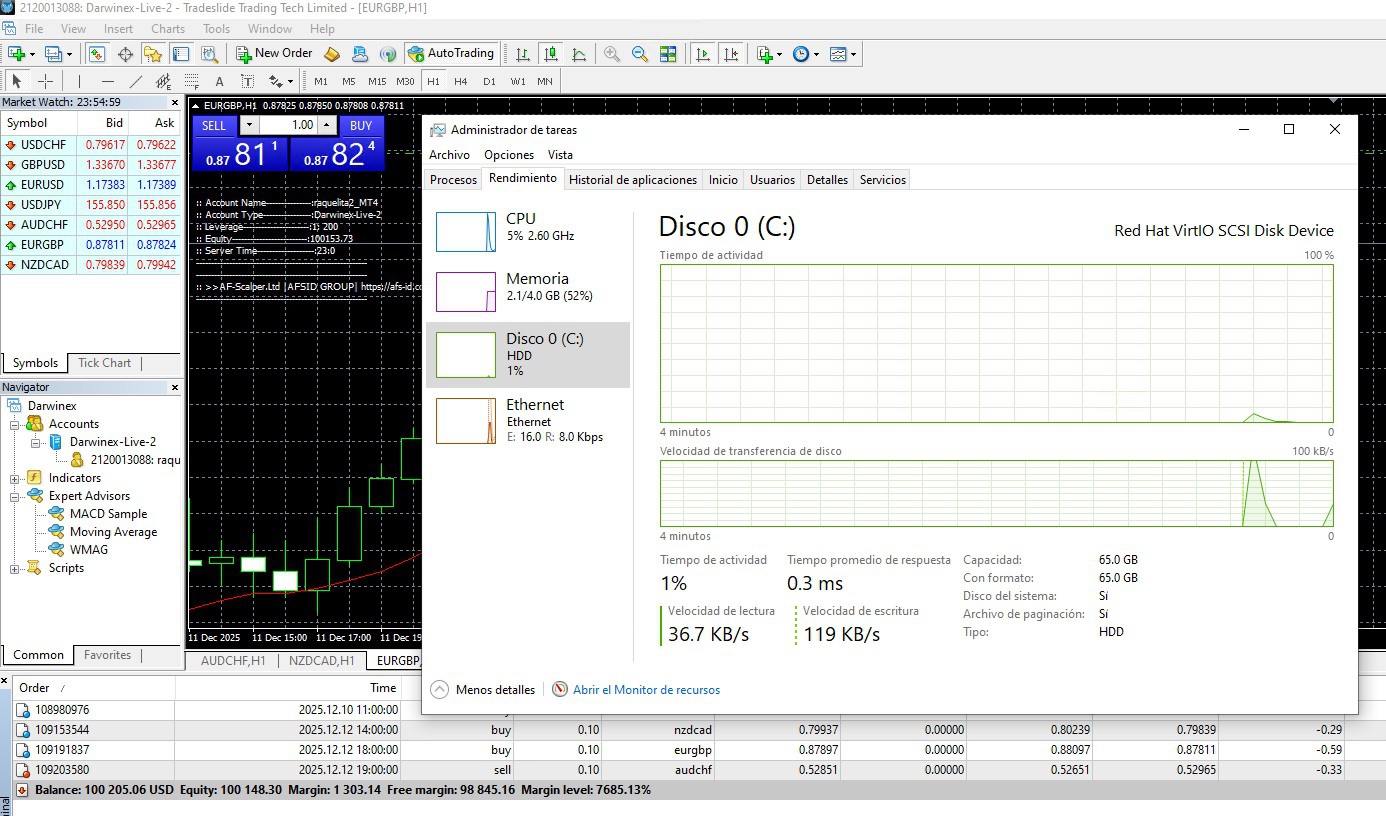
Application Performance Evidence
Optimization Tips
To be honest, I didn't need to make many tweaks because the VPS ran smoothly right out of the box. Since MT5 is pretty lightweight, most of the performance came naturally. My main "optimization" was simply keeping the setup clean—no unnecessary apps, no background tools, nothing running that could eat up CPU or RAM. I also make sure to keep Windows and MT5 updated so things stay stable. Other than that, everything just works without needing extra tuning.
Conclusion & Recommendations
In conclusion, my experience with Database Mart's Windows Desktop VPS has been highly positive. The server runs stably and reliably, with healthy resource usage even while running a single MetaTrader 5 instance. I haven't encountered any crashes or technical issues, and the VPS environment is fully compatible with MT5, requiring no additional configuration.
For anyone looking to run Forex trading software or similar applications, I recommend Database Mart VPS—ensures a smooth and hassle-free experience. This setup is particularly well-suited for beginners or anyone seeking a ready-to-use, dependable VPS environment for trading.
Why Choose DBM?
I chose Database Mart primarily because of its affordable pricing for Windows VPS, which offers excellent value compared to other providers. For the same level of resources, such as CPU, memory, and storage, other VPS providers typically charge nearly twice as much. This cost efficiency, combined with the stable performance and full compatibility with the MetaTrader 5 platform, made Database Mart the ideal choice for my Forex trading needs.