


Customer Story: Building a Production-Grade Discord Bot Platform with Database Mart Linux VPS
"I'm the developer and operator of Omni Discord Bot, a production-grade Discord bot platform built with TypeScript and discord.js. The server I'm using is Basic Plus Linux VPS, primarily dedicated to running the bot's backend services and supporting its persistent data infrastructure. It handles real-time Discord interactions, scheduled background tasks, analytics, and a web-based administrative dashboard. Because the bot is actively used across multiple Discord servers, reliability, data consistency, and predictable performance are critical.
The following sections describe how I deployed, configured, and operated this system in a real production environment, along with the practical results and lessons learned."
Submitted by user "karlb***@gmail.com"
Application Scenario
I run Omni Discord Bot, a production-grade Discord bot platform that supports multiple servers simultaneously with full data isolation per server. I use my server to host the bot's backend services and persistent database, which powers features like voice activity tracking, moderation tools, in-server economy systems, trivia and game mechanics, achievement tracking, and automated scheduled tasks.
In addition, I host a web-based admin dashboard that allows me to monitor activity, manage server configurations, and query both live and historical data. My workflow is highly event-driven: user interactions trigger frequent database reads and writes, while automated scripts handle scheduled tasks and background processes continuously process analytics. The system runs 24/7, and I’ve designed it to maintain reliability and consistent performance without manual intervention, even as I add new features and expand its capabilities.
Server Specifications
✅ CPU: 6 vCPU Cores
✅ RAM: 12GB
✅ Storage: 180GB SSD
✅ Bandwidth: 200Mbps Unmetered
✅ Backup: Once per 4 Weeks
✅ IP Address: 1 Dedicated IP
✅ Operating System: Linux (Ubuntu Server LTS)
Deployment Process
To deploy Omni Discord Bot on my VPS, I first provisioned the server and verified the OS and network access. I installed Node.js (LTS), system dependencies, and FFmpeg for audio processing. Then I securely uploaded my application source code and installed all required npm dependencies.
Next, I configured environment variables for database connections, API keys, and runtime settings, and connected the application to the Database Mart–hosted database. I ran database initialization and schema setup scripts, then started the application services. I verified that all connections, logging, and background tasks were running correctly.
The entire setup required no support intervention, and the environment was production-ready immediately. This straightforward deployment process allowed me to focus on developing features rather than managing infrastructure.
Resource Utilization (Under Load)
- CPU: Very low usage, mostly 0–1% per core (4 cores total). Tasks put minimal pressure on the CPU.
- Memory: 11.7 GB total,
6.4% used (747 MB). No swap in use, plenty of free memory. - Processes: Most processes are sleeping; major services (Discord bot, system daemons) use minimal CPU and memory. No process exceeds 2% CPU.
- System Load: Load averages 0.06, 0.04, 0.01—well below the number of cores.
Conclusion: The server is mostly idle, with abundant spare CPU and memory. Current services run smoothly with no bottlenecks, leaving ample capacity for additional workloads or more demanding tasks.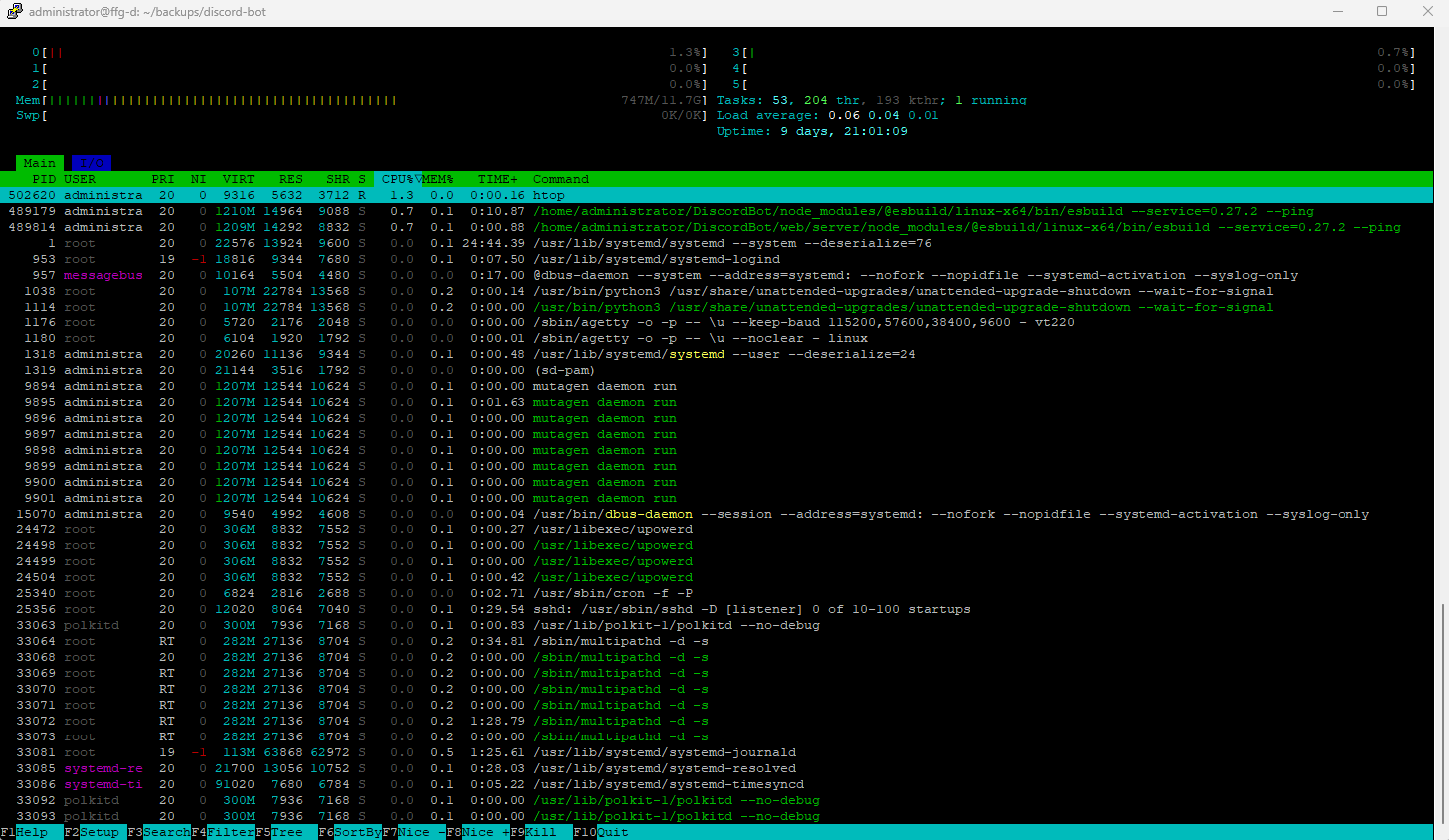
Performance Review
Under typical load, my server runs Omni Discord Bot very smoothly and consistently. Database connections remain stable, queries return quickly, and I haven't experienced unexpected slowdowns, disconnects, or resource contention. The system handles real-time Discord interactions, scheduled background tasks, and concurrent user activity without noticeable latency.
I've tuned Node.js memory usage, scheduled background tasks at sensible intervals, and optimized database queries to ensure predictable performance. Logging is configured to avoid excessive disk or database writes, and all I/O is non-blocking. Overall, the environment is reliable enough that I rarely need to monitor or restart services, which allows me to focus on developing new features rather than managing infrastructure.
Network Performance
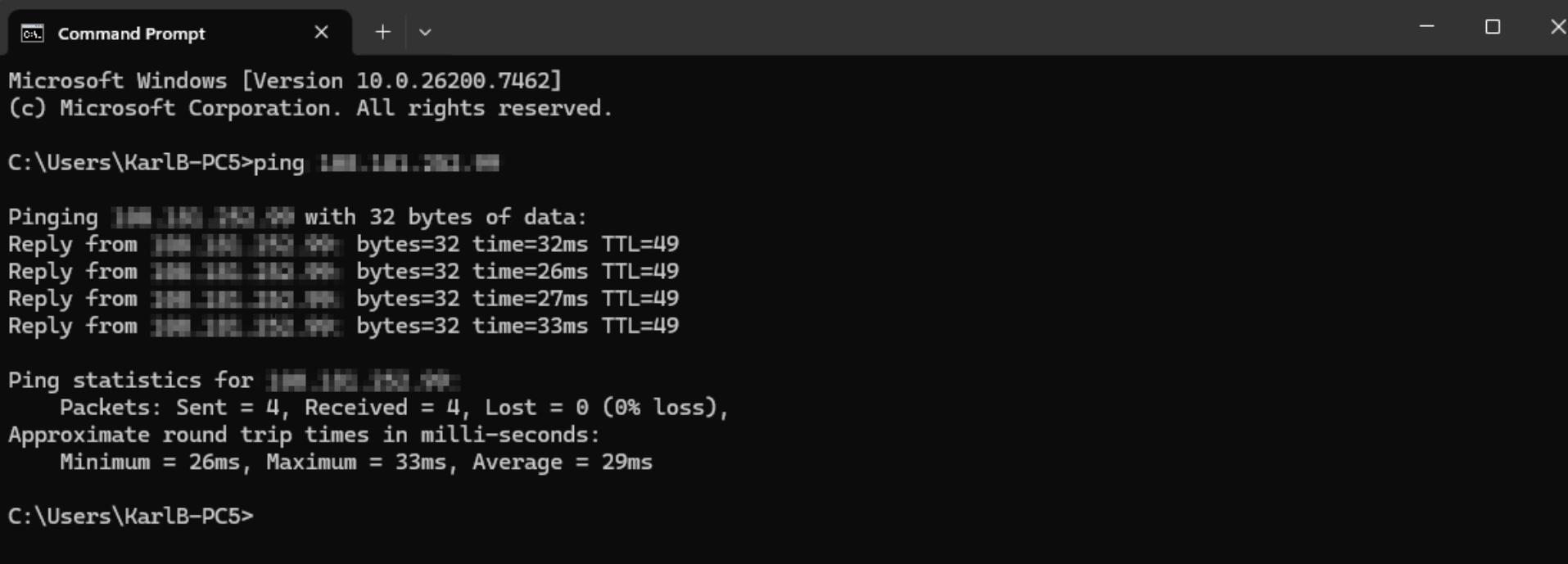
Ping Test
- Latency: 26–33 ms, average 29 ms – very low latency, indicating fast response times.
- Stability: Minimal variation between round-trip times (26–33 ms), showing a stable connection with no noticeable jitter.
- Packet Loss: 0% – the network is highly reliable with no data loss.
Speed Test
- Download Speed: 191.07 Mbit/s – sufficient for real-time interactions and background tasks.
- Upload Speed: 231.84 Mbit/s – excellent for data-intensive operations and audio streaming.
The server's network is fast, stable, and highly reliable, providing a solid foundation for running a production Discord bot.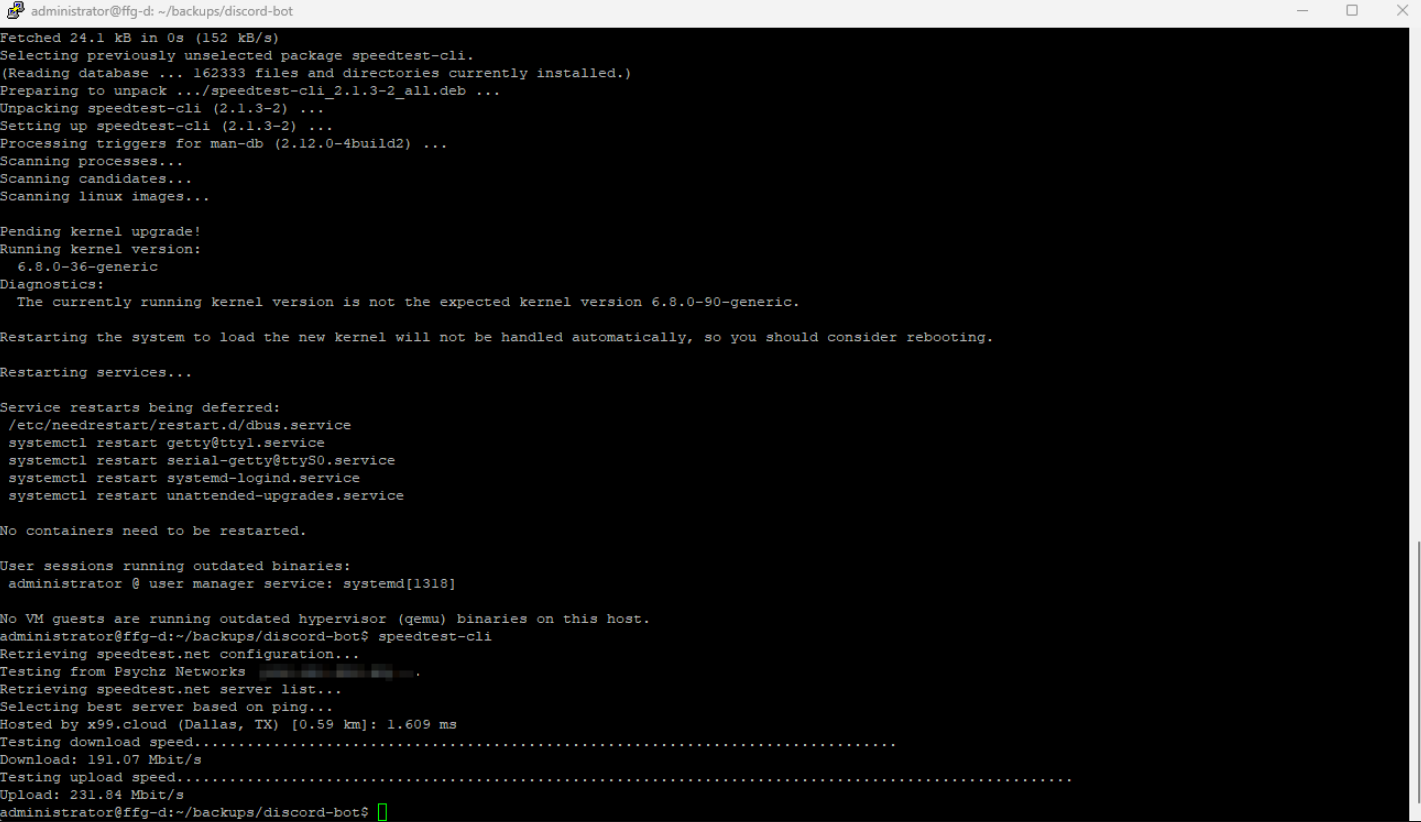
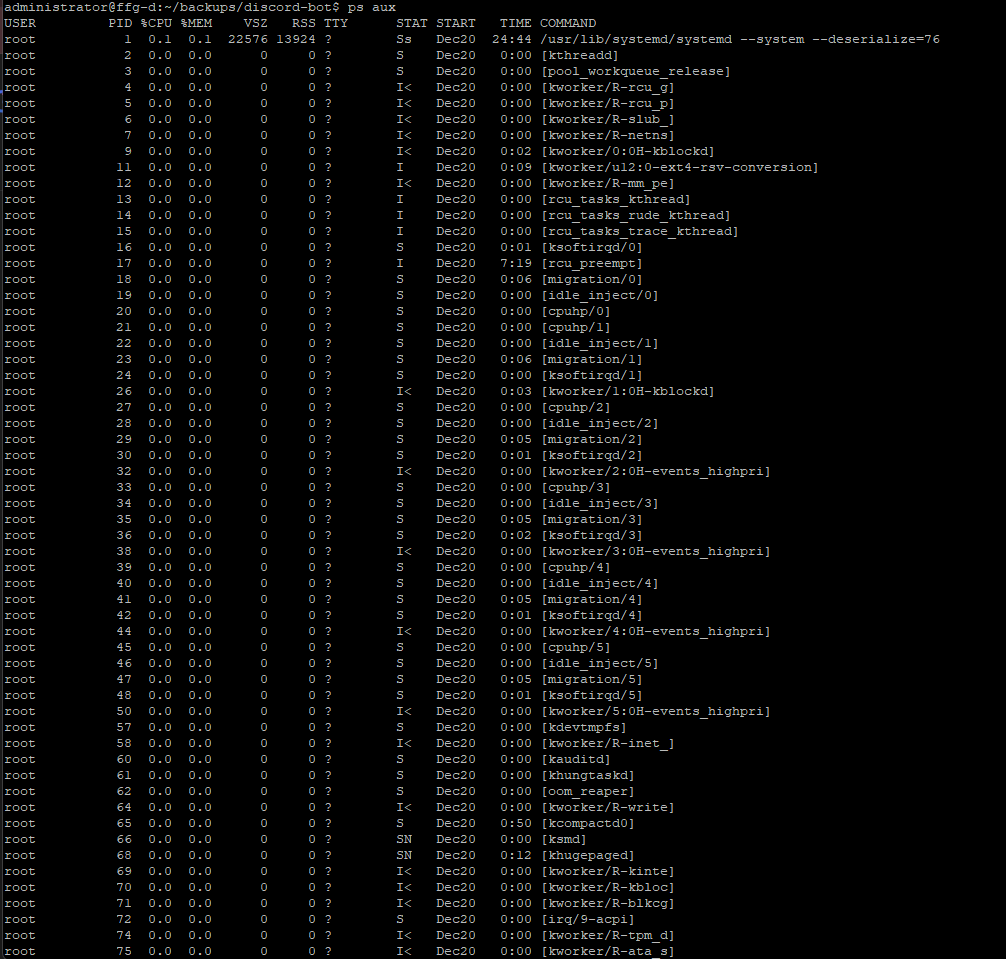
Application Performance Evidence
Reliability Evaluation
- Uptime: Since the server was put into use, it has been operating stably and continuously for 8 days and 22 hours without any interruption.
- Crashes/Restarts: I have not experienced any crashes or required forced restarts during this period.
- Stability under Load: The server handles multiple concurrent Discord, dozens to hundreds of active users, scheduled background tasks, and the admin dashboard without noticeable slowdowns or disruptions.
- Operational Confidence: The environment is stable enough that I rarely need to monitor or manually intervene, allowing me to focus on developing features rather than maintaining infrastructure.
Overall, the server has proven highly reliable, delivering consistent uptime and stable performance for a production-grade Discord bot platform.
Optimization Tips
To improve performance, I focused on application-side optimizations rather than aggressive server tuning. This included using non-blocking asynchronous patterns, optimizing database queries, and avoiding unnecessary polling. Background tasks were scheduled at sensible intervals instead of running continuously, and logging was tuned to avoid excessive disk or database writes. Keeping resource usage predictable and avoiding over-allocation proved more effective than trying to push the server to its limits.
Conclusion & Recommendations
From my experience, the DBM Linux VPS has been rock-solid for running my production Discord bot. It handles multiple servers, lots of concurrent users, scheduled tasks, and the admin dashboard all at once without slowing down. Database connections are stable, queries are fast, and everything runs smoothly 24/7—basically, I don't have to babysit it.
Here's what I learned works best:
- Keep it simple. Use straightforward database connections and predictable configs instead of layering on unnecessary tools.
- Optimize the app itself. Stick to async patterns, clean queries, and smart scheduling for background tasks.
- Watch your resources. Keep an eye on CPU, memory, and I/O early on to know what “normal” looks like.
- Modularize features. Enable or disable modules per server to control load.
- Backups and logging matter. They save you a lot of headaches if something goes wrong.
Overall, DBM Linux VPS just works. It's like having a reliable production server that stays out of your way, letting me focus on building features instead of worrying about infrastructure.
Why Choose DBM?
I picked DBM Linux VPS Server because I wanted a hosting solution that just works—no unnecessary layers, no forced tooling, and no surprises. The setup was fast and straightforward, the environment behaves exactly like a real production system, and I had full control over connections and configurations from day one.
Pricing was reasonable for what you get, the docs are clear, and the performance has been rock-solid. Basically, DBM lets me focus on building features for my Discord bot instead of babysitting the server. For anyone looking for a reliable, transparent, and no-nonsense database host, DBM just makes sense.