


Customer Story: Accelerating StrategyQuant Optimization with High-Performance Dedicated Server
"I am an algorithmic trading researcher and strategy developer who focuses on developing, backtesting, and optimizing trading strategies using StrategyQuant. I use professional tools like StrategyQuant (versions 136 and 142) to rigorously test and validate trading ideas, ensuring robust performance before deployment.
I needed a powerful hosting solution that could deliver stable performance and handle multiple high-load processes simultaneously. After comparing different providers, I chose Database Mart's Professional Dedicated Server, which offers the perfect combination of high performance, reliability, and affordability for my algorithmic trading research needs."
Submitted by user "mvar***ect@gmail.com"
Application Scenario
I mainly use the server for large-scale algorithmic trading research, including strategy generation, backtesting, retesting, and optimization in StrategyQuant. My daily workflow involves running multiple StrategyQuant instances, processing large datasets, and executing long-duration optimization tasks that fully utilize the CPU and memory resources. The server operates smoothly even under heavy workloads, maintaining stable performance during continuous computations. Occasionally, I schedule automated tasks or set up batch optimizations to run in the background. Overall, the Professional Dedicated Server - SSD is powerful and reliable enough to support my quant research workflow efficiently.
Server Specifications
✅ CPU: Dual Intel Xeon E5-2660 @ 2.20 GHz (16 Cores / 32 Threads)
✅ RAM: 128GB
✅ Storage: 120GB SSD + 960GB SSD
✅ Bandwidth: 100Mbps–1Gbps
✅ Operating System: Windows
✅ Dedicated IP: 1 IPv4
Deployment Process
Step 1: Access the Server
I began by connecting to my dedicated server through Remote Desktop, ensuring I had full access to the Windows environment for my StrategyQuant setup.Step 2: Prepare the System Environment
After confirming the system configuration, I installed basic utilities needed for my workflow. The first tool I added was WinRAR, downloaded directly from its official website, so I could extract compressed files on the server.Step 3: Upload StrategyQuant Files
Next, I transferred the portable StrategyQuant installation package to the server. Since I use multiple versions (136 and 142), I uploaded both to keep them available for testing and comparison.Step 4: Extract and Launch StrategyQuant
Using WinRAR, I unzipped the StrategyQuant folders to the target directory. I then launched the application and performed a quick initial check to ensure everything loaded properly. I kept the default port and did not modify any performance-related or optimization parameters.Step 5: Configure Workflow and Run Tasks
Once StrategyQuant was running, I began setting up my workflow. This included configuring scheduled tasks or launching strategy generation, backtesting, and optimization processes manually. Since the server runs stable at full CPU load, I can run 1–2 StrategyQuant instances simultaneously without making any special performance adjustments.
Performance Review
"It works without any problem, on the contrary, I am surprised by the performance. This information will be replicated in my community."
During my time using the Professional Dedicated Server - SSD, the overall performance has been exceptional. Even when running 1–2 StrategyQuant instances simultaneously—each consuming up to 80–100% of available CPU threads and large amounts of RAM—the system remained stable, responsive, and consistently reliable.
Backtesting, retesting, and large-scale optimization tasks ran smoothly without any slowdown, stuttering, or unexpected interruptions. The server handled long-duration workloads effortlessly, delivering the high computational
Network Performance
Based on the network tests performed on the server, the overall network performance is fast, stable, and highly reliable.
Low Latency (Ping Test)
The ping test to 8.8.8.8 shows excellent latency performance:
Ping: 12 ms
Packet Loss: 0%
Stability: All responses consistent at 12 ms
This level of latency indicates a very stable and responsive connection, ensuring smooth remote access and instant interaction with StrategyQuant or other tools on the server.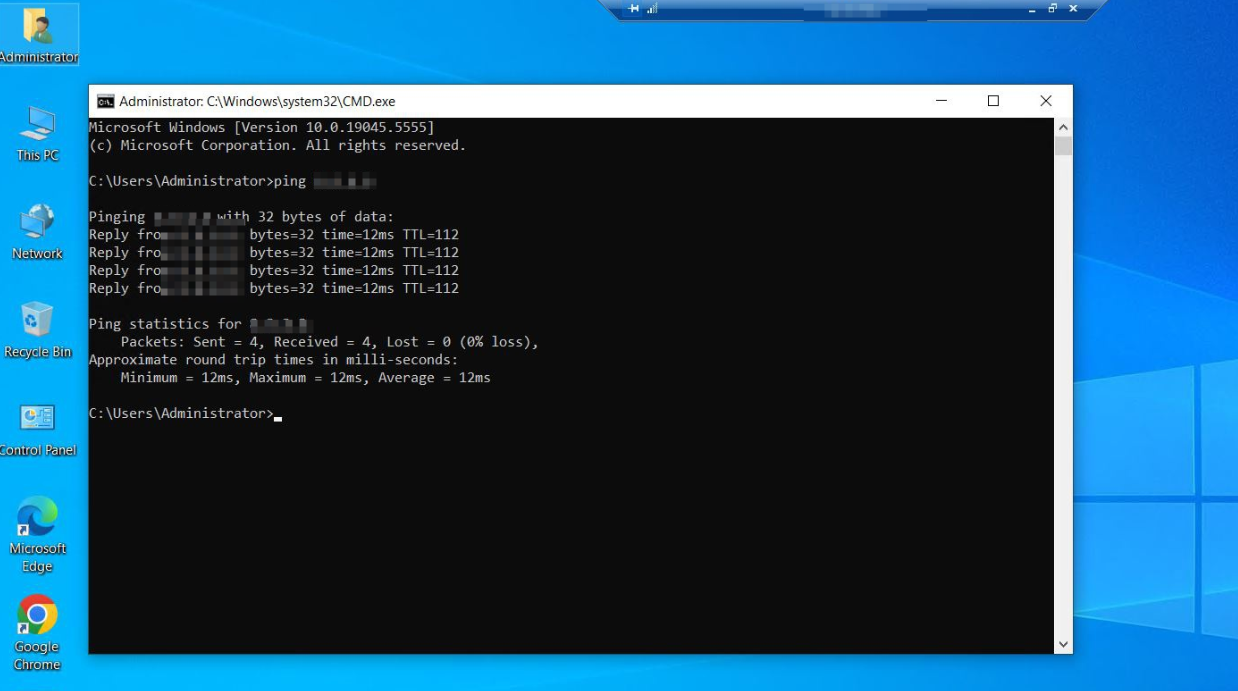
High-Speed Bandwidth (Speed Test)
The Speedtest results show strong upload and download throughput:
Download: 94.59 Mbps
Upload: 94.63 Mbps
Latency: 9–18 ms
This confirms that the server delivers nearly full utilization of its 100Mbps port, providing fast data transfers and a smooth remote operating experience.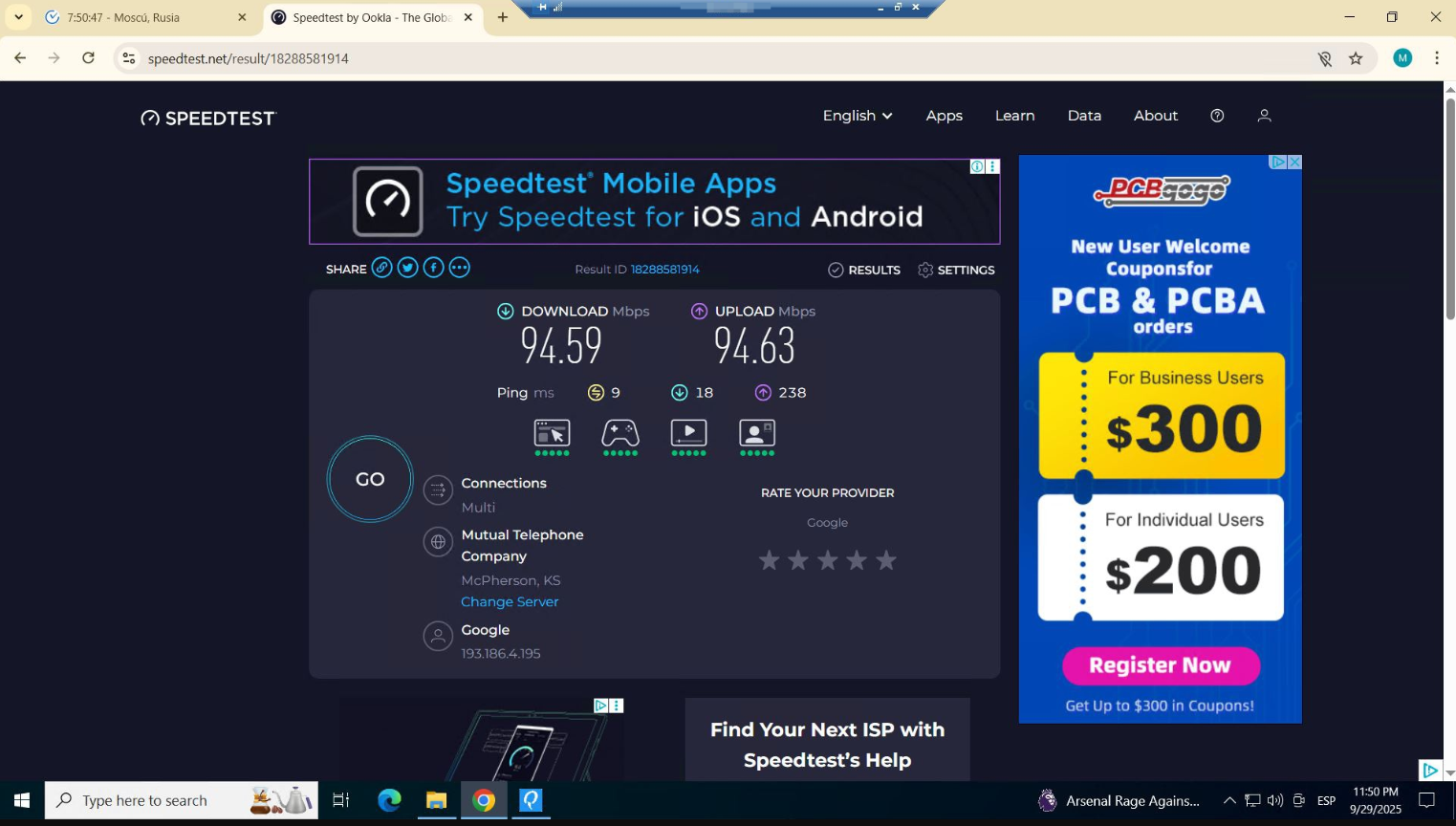
Reliability Evaluation
I've been using Database Mart's Professional Dedicated Server (SSD) to run StrategyQuant for backtesting and optimizing algorithmic trading strategies. Here's what I found:
- Stable Performance: The server handled 1–2 simultaneous StrategyQuant instances at full CPU and heavy RAM usage with no crashes or interruptions.
- Continuous Operation: Ran for 10+ hours straight without any issues.
- Easy Setup: StrategyQuant portable version ran out-of-the-box, no driver or performance tweaks needed.
- High Reliability: Even under maximum load, the system remained responsive and stable.
Resource Utilization (Under Load)
During our usage, running 1–2 instances of StrategyQuant for strategy generation, backtesting, and optimization fully utilizes the CPU (100%) while RAM usage remains low at 19%, indicating ample memory headroom. Even under full CPU load, the server remains stable and responsive, handling large computational tasks with ease, which also means additional workloads or parallel tasks can be scaled without impacting performance.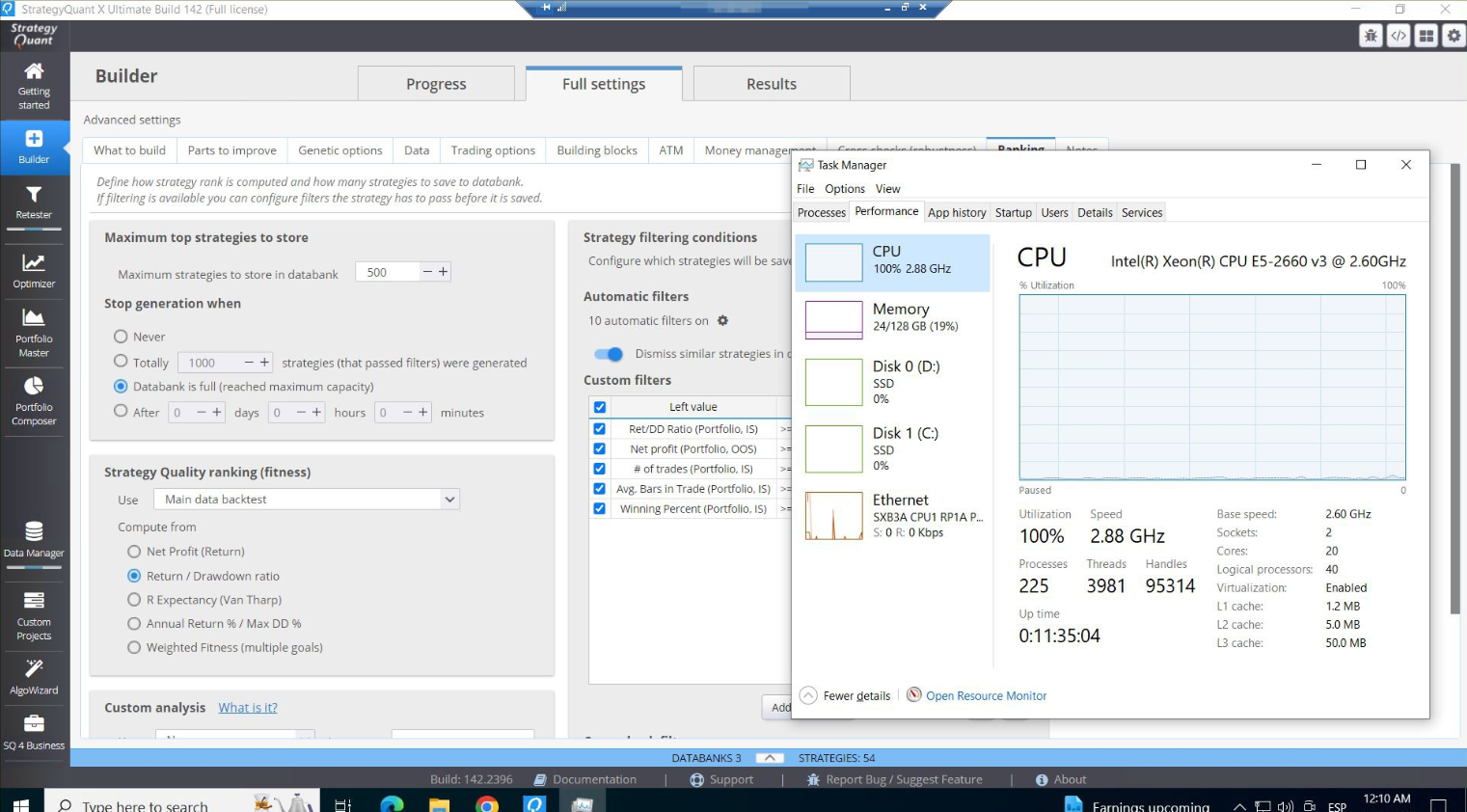
Application Performance Evidence
Optimization Tips
- Default Settings Are Enough: StrategyQuant runs efficiently on the server without any manual tuning. CPU, RAM, or thread configurations do not need adjustment for typical backtesting, retesting, and optimization tasks.
- Automated Workflow: Use scheduled tasks or automated scripts to run StrategyQuant processes. This ensures continuous computation without manual intervention and keeps resource utilization consistent.
- Parallel Instances: Running 1–2 simultaneous instances fully utilizes CPU while leaving memory headroom. Additional instances may be possible depending on RAM, but CPU is typically the bottleneck.
- Minimal Configuration: Keep default ports and settings to maintain stability. No extra drivers or dependencies are required, simplifying deployment and reducing potential issues.
Conclusion & Recommendations
The Professional Dedicated Server from Database Mart has proven to be an excellent choice for running StrategyQuant and conducting intensive algorithmic trading research. It handles 1–2 simultaneous instances at full CPU load smoothly, and memory usage remains low, leaving room for additional tasks. The setup was quick and straightforward, requiring no extra drivers or configuration tweaks. The system has been running stably for hours without crashes or interruptions. For traders and researchers who need reliable, high-performance computing for backtesting, optimization, and strategy generation, Database Mart's dedicated hosting is definitely a great solution.
Why Choose DBM?
"We chose Database Mart primarily for its exceptional performance-to-price ratio. The hosting service offers powerful hardware at very competitive prices, making it ideal for compute-intensive applications like StrategyQuant. In addition, the provisioning process was fast and seamless, and the platform's interface is user-friendly. We highly recommend Database Mart for anyone in need of a reliable and cost-effective server for algorithmic trading development and testing."