


Customer Story: Deploying Minecraft Gaming Hosting with Professional Dedicated Server - SATA
"I am currently building a scalable and cost-effective Minecraft hosting platform for Minelobby, a new server hosting company focused on delivering affordable, reliable, and interconnected game server solutions. Our goal is to create a high-performance infrastructure that can automatically deploy, manage, and optimize Minecraft servers while ensuring smooth gameplay, minimal downtime, and long-term stability for future customers.
To support this vision, I needed a powerful and dependable dedicated server capable of handling multiple game instances, automated provisioning, and real-time resource management. After evaluating several hosting providers, I chose Database Mart's Professional Dedicated Server (SATA), which offered the ideal combination of performance, stability, and affordability. Its consistent uptime, excellent support, and strong hardware reliability made it the best option for building and testing Minelobby's server infrastructure."
Submitted by user "limited***@gmail.com"
Application Scenario
I use Database Mart's Professional Dedicated Server (SATA) as the backbone of my Minecraft hosting platform, Minelobby. On this server, I deploy the full Pterodactyl stack—including the Panel, Airx, Wings, and Nginx—together with automated scripts and preset installation tools. This setup allows me to perform large-scale, standardized Minecraft server deployments with high efficiency.
In my environment, the dedicated server handles several critical tasks:
Automated Minecraft Server Provisioning
By leveraging Pterodactyl nodes, Wings, environment variables, and eggs, I can rapidly generate and automatically configure new Minecraft server instances with minimal manual intervention.Multi-Instance Resource Management
I assign dedicated CPU, RAM, and disk resources to each Minecraft server. This ensures stable performance across all instances and prevents resource contention during peak usage.Real-Time Performance Monitoring & Dynamic Optimization
With Pterodactyl's limits, weights, and custom startup parameters, I can intelligently allocate resources based on real-time load, improving overall performance and efficiency.Network Connectivity & Port Management
Through proper port allocation, network rule configuration, and firewall policies, each server instance maintains smooth external communication without network interruptions.Scalable Hosting Environment
My infrastructure is designed to accommodate automated creation, management, and monitoring of a large number of Minecraft servers as Minelobby continues to grow.Stable Workload Operation
During long-term stress tests, the dedicated server demonstrated exceptional stability. I experienced no crashes, freezes, or forced restarts, confirming that the setup is capable of supporting production-grade hosting workloads.
Server Specifications
✅ CPU: 8-Core Intel Xeon E5-2667 v4 @3.20GHz
✅ RAM: 64GB
✅ Storage: 120GB SSD + 4 × 8TB SATA
✅ Bandwidth: 100Mbps – 1Gbps
✅ Operating System: Debian 12
✅ IP Address: 1 Dedicated IPv4
Deployment Process
To configure my Dedicated Server for Minelobby, I leveraged various installers and programs I had previously developed, deploying them via SSH. Within Pterodactyl, I configured the necessary settings to ensure smooth server management. This included:
- Setting up nodes and Wings, allocating resources such as CPU, RAM, and disk space for each game server.
- Configuring startup parameters, environment variables, and port allocations to ensure proper connectivity.
- Adjusting network configurations for reliable server communication.
- Creating server templates (eggs) for Minecraft to streamline deployment.
- Configuring user permissions and roles within the panel.
For performance optimization:
- Allocated specific amounts of RAM and CPU cores to each game server to ensure stability.
- Set memory limits and CPU weights to prevent resource contention and balance server load.
- Adjusted thread counts and startup flags where applicable for optimal efficiency.
- GPU allocation was not required in the current testing environment.
Additional customizations included applying the Arix theme to Pterodactyl to improve UI and enhance the overall user experience.
Performance Review
Concurrent Instances: At the moment, only a single user is running servers for testing purposes. The system is capable of hosting multiple instances simultaneously, and resource allocation settings are designed to prevent any single server from consuming excessive CPU or RAM.
Uptime: Since the server was deployed, it has been running continuously without interruption, delivering stable and reliable performance throughout my testing.
Overall Performance: The server performs excellently under typical load. It runs smoothly with no noticeable lag, downtime, or instability during testing. Resource allocation is consistent, and even under stress tests, the server has remained stable and responsive. This level of reliability and performance is far better than other providers previously used.
Network Performance
Ping Latency
- Latency: ~107 ms
- No packet loss
- Stable readings with minimal variance
A 107 ms round-trip latency is normal for cross-region U.S. connectivity. The absence of jitter or packet loss indicates a stable and reliable network path, which is critical for game-server hosting. While very latency-sensitive games require <50 ms, Minecraft typically works well even with ~100 ms.
Speedtest
- 94 Mbps download
- 93 Mbps upload
- 0% packet loss
- Very low jitter (excellent stability)
The server is achieving nearly full output for a 100 Mbps symmetric port. Symmetric throughput is ideal for hosting games because Minecraft servers require consistent upload bandwidth for player updates and world data synchronization.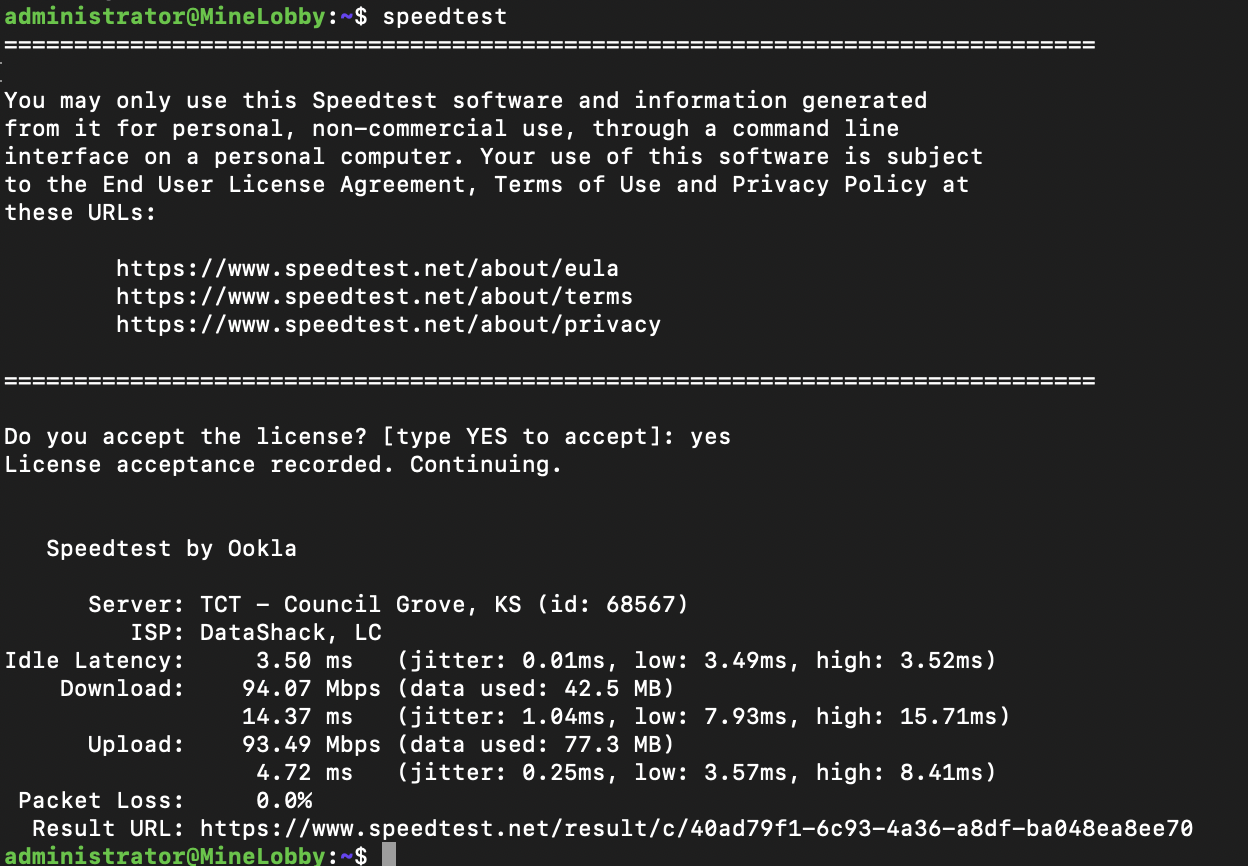
Reliability Evaluation
During my testing period, the server has demonstrated excellent reliability and stability. It has been running continuously without interruption since deployment, with no crashes, forced restarts, or unexpected downtime. Even under stress tests and typical workloads, performance remained smooth, consistent, and responsive. Resource allocation behaved as expected, and the system maintained stable CPU and memory usage across multiple game server instances.
This level of reliability has provided strong confidence that the server can support production-level workloads for game hosting. Overall, the server's uptime, stability, and performance have significantly exceeded my expectations compared to other hosting providers I’ve previously used.
Resource Utilization (Under Load)
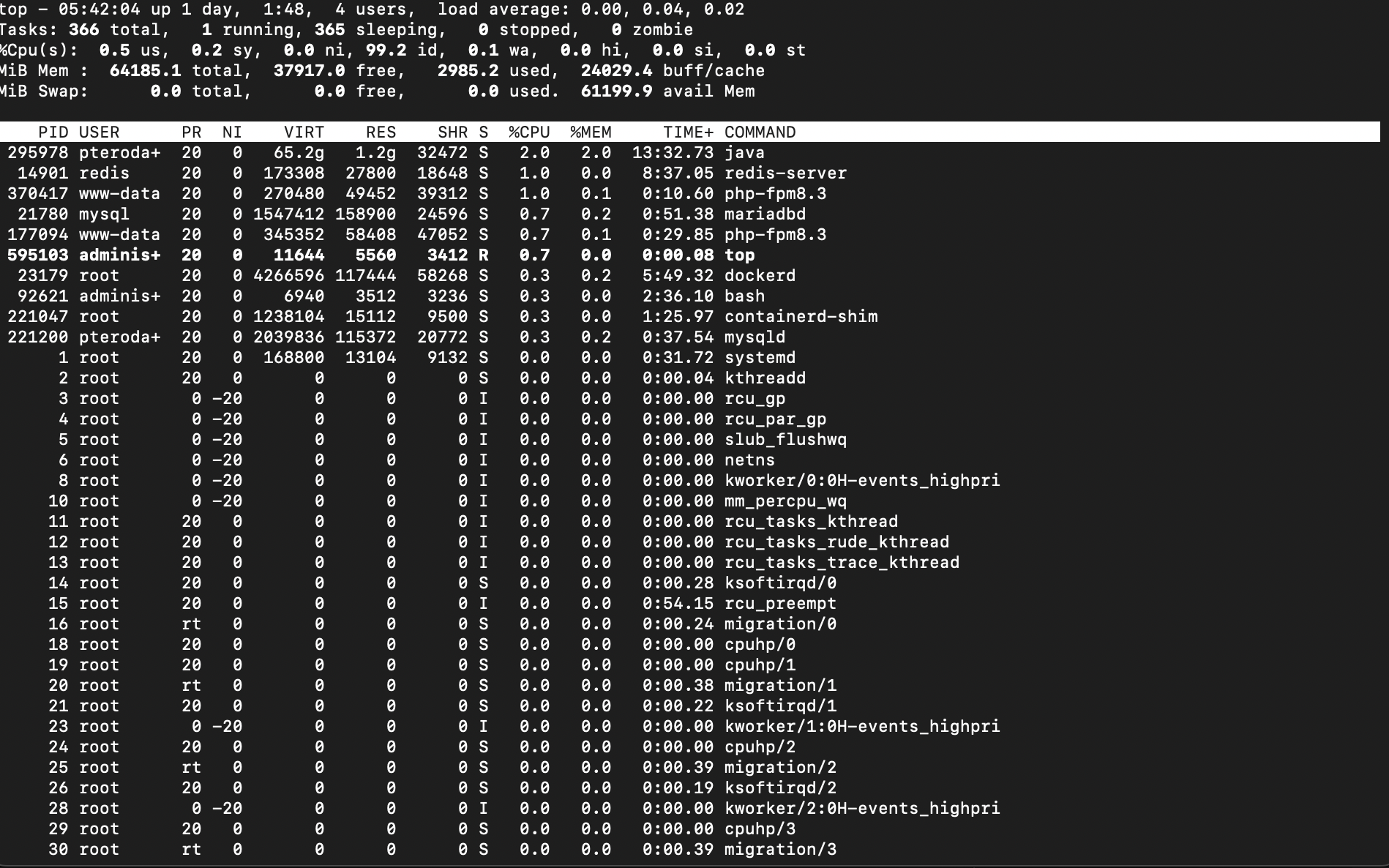
Application Performance Evidence
Optimization Tips
To achieve stable and efficient performance, I optimized the server by carefully allocating CPU and RAM limits for each game instance within Pterodactyl. Setting clear resource limits helped prevent any single server from overconsuming system resources. I also applied optimized startup flags, environment variables, and lightweight configurations to improve stability during operation.
Additionally, I enabled automated provisioning to ensure every deployed server uses consistent and reliable settings. Continuous monitoring of network, memory, and system load allowed me to make timely adjustments throughout testing. These optimizations helped maintain smooth performance, reduce contention, and ensure long-term reliability for game server hosting.
Conclusion & Recommendations
Based on my testing, the server has delivered strong performance, excellent stability, and zero downtime, making it well-suited for game server hosting. Proper resource allocation—especially defining CPU and RAM limits within Pterodactyl—proved essential for maintaining smooth operation and preventing conflicts between instances.
For other users, I recommend setting clear resource limits, monitoring system usage regularly, and using lightweight configurations to reduce overhead. Ensuring that dependencies, Docker services, firewall rules, and port mappings are correctly configured will also help avoid deployment issues. Automating provisioning and applying consistent settings across servers can further enhance reliability. Following these practices will help achieve stable performance and a more efficient hosting environment.
Why Choose DBM?
"We chose Database Mart because of its affordable pricing combined with excellent performance and reliability. The value offered is unmatched compared to other providers we have tested. In addition, the support team has been lightning fast in responding to questions and providing assistance, which makes the entire experience smooth and efficient. We highly recommend DBM for its outstanding hosting service, competitive prices, and exceptional technical support."