


Customer Story: Reliable and Cost-Effective Windows VPS Hosting for Kentico & Umbraco CMS Websites
"I am a web developer, and www.mustafanoman.com is my website. My work mainly involves maintaining and deploying websites built on Kentico and Umbraco CMS. These projects place high demands on server stability, compatibility, and cost efficiency, and shared hosting environments often fall short in terms of performance, permissions, and overall control.
For this reason, I chose Database Mart's Basic Windows Server VPS as the core server for centrally hosting my client's websites. With a dedicated VPS environment, I have full control over the server configuration, runtime environment, and deployment process, which has significantly improved website stability and overall operational efficiency.
Below, I will share my real-world experience with the server, including the deployment process, daily workflow, and overall usage experience."
Submitted by user "norman***@****.com"
Application Scenario
The Basic Windows Server VPS is primarily used to host multiple client websites built on Kentico and Umbraco CMS. It provides a centralized and stable environment for running IIS, Microsoft SQL, and modern .NET Core applications. The server supports automated build and deployment through Azure Pipelines, enabling continuous integration and delivery for client projects.
Server Specifications
✅ CPU: 4 vCPU Cores
✅ RAM: 8GB
✅ Storage: 140GB SSD
✅ Bandwidth: 200Mbps Unmetered
✅ Backup: Once per 4 Weeks
✅ IP Address: 1 Dedicated IP
✅ Operating System: Windows Server 2022 Standard Edition x64
Deployment Process
I start by setting up my Windows Server 2022 VPS with all the tools I need: IIS, Microsoft SQL Server Express 2025, SQL Server Management Studio 22, Visual Studio 2026, Git, VS Code, and .NET Core 9 & 10. I also configure IIS with URL Rewriter to make sure my websites run smoothly.
For deployment, I rely on Azure Pipelines. I've installed both the Azure Build Agent and Deploy Agent on the server, so my websites can be automatically built and deployed directly to IIS. I usually host 3–4 client websites at the same time, and automated scripts plus scheduled tasks help keep everything running without interruptions.
I mostly keep the default settings for my applications—no special adjustments for CPU or memory—but I do fix any initial issues that pop up, like missing .NET dependencies, by installing the necessary frameworks and hosting bundles.
Resource Utilization (Under Load)
- CPU: 4%~8%
- Memory: ~41%
The CPU usage of my VPS is generally only 4% to 8%, which is basically not a problem. It is more than enough to run 3 to 4 websites along with the tasks of the Azure Pipeline. About 41% of the memory has been used, and nearly half of it is still unused, so the system is quite easy to handle.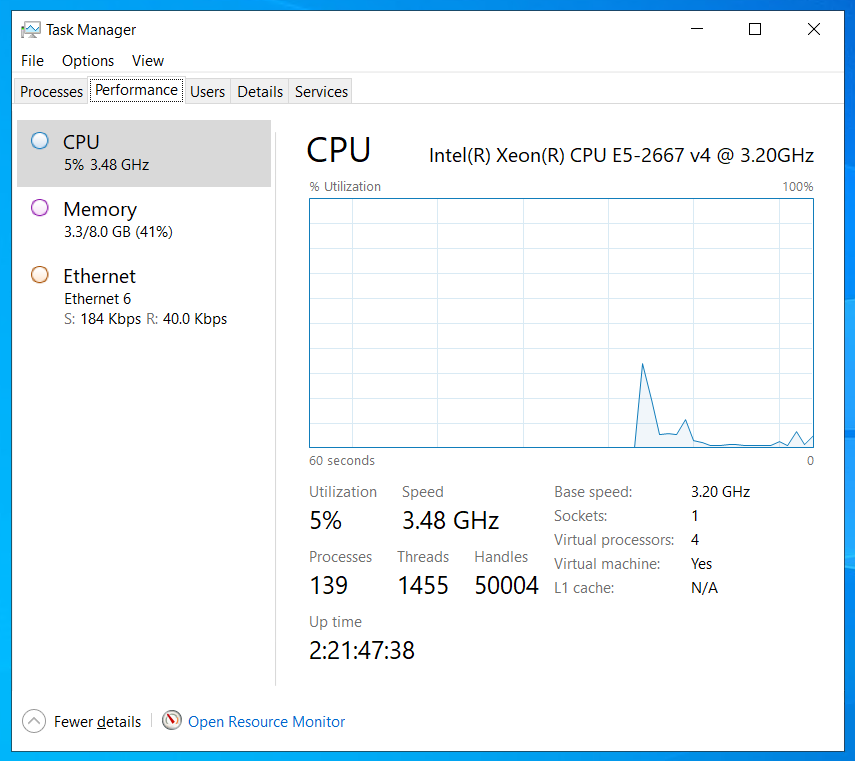
Performance Review
Since moving my websites to this VPS, everything has been running smoothly. I set up IIS, SQL Server, Visual Studio, and .NET Core, then automated deployment using Azure Pipelines. The server handles 3–4 websites easily, with CPU usage around 4%–8% and memory at about 41%, leaving plenty of headroom. Performance is stable, websites load fast, and issues like timeouts or user logouts are gone. Overall, the VPS is reliable, efficient, and ready to support future growth.
Network Performance
Ping Test
The network is stable with zero packet loss. Although the latency is a bit high, the fluctuations are very small, which is more than sufficient to support my website hosting.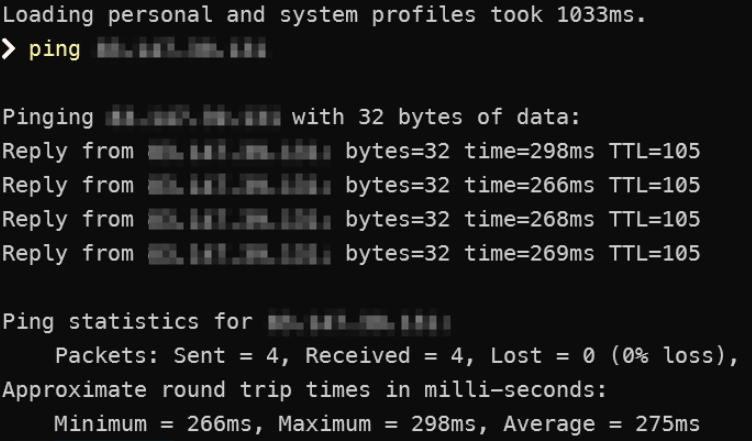
Speed Test
- Download speed: 284.23 Mbps
- Upload speed: 17.07 Mbps
The download speed is 284.23 Mbps, which is very fast—browsing is almost completely smooth with no noticeable lag. The upload speed is comparatively slower at 17.07 Mbps. It's sufficient for regular website hosting, but uploading large files might feel a bit slow.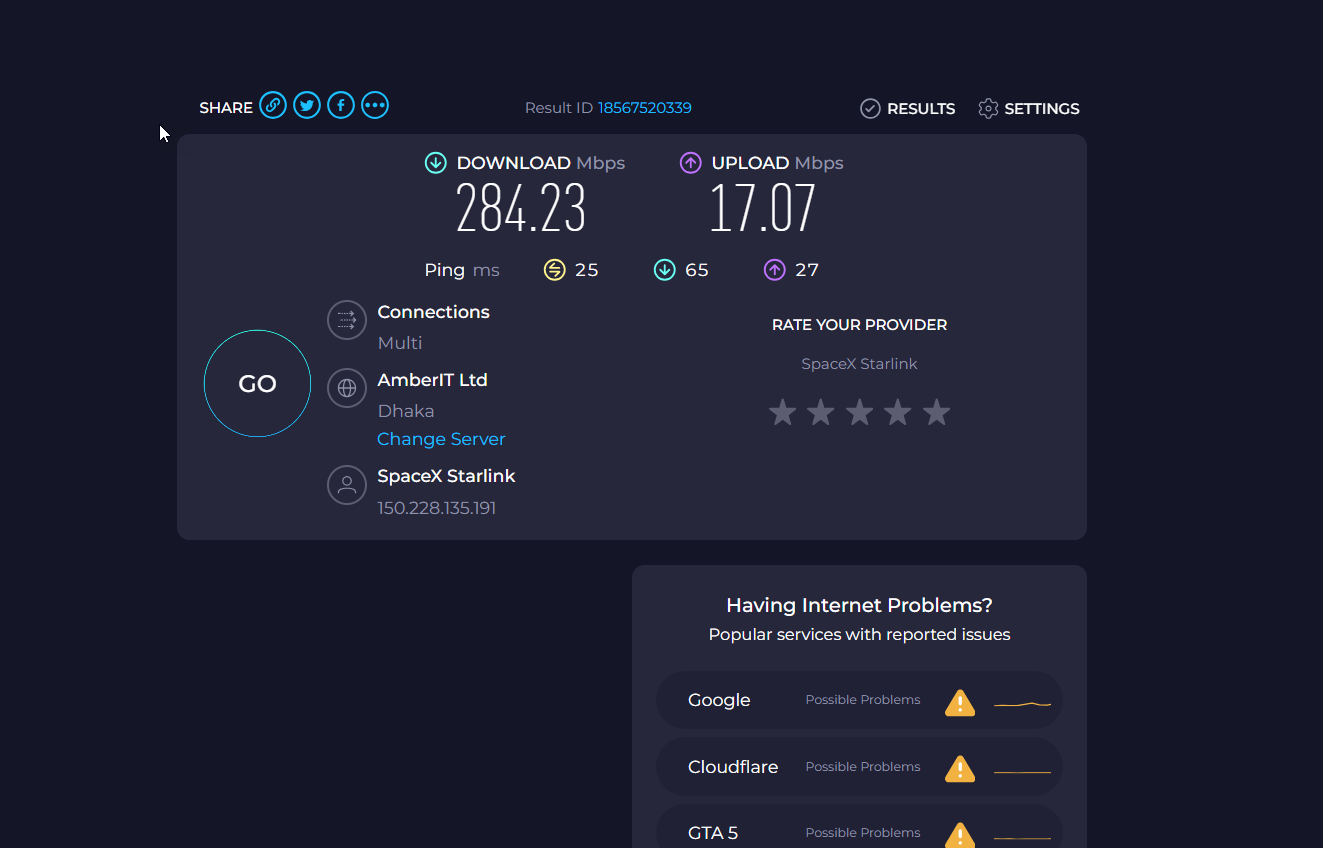
Application Performance Evidence
Reliability Evaluation
The VPS has proven to be highly reliable for hosting multiple client websites built on Umbraco and Kentico CMS. During typical usage, running 3–4 websites with automated scripts and scheduled tasks, the server remains stable with minimal lag. There have been no crashes or forced restarts, and it handles continuous operations without noticeable interruptions. Compared to previous shared hosting, the VPS significantly improved performance and stability, eliminating issues such as slow response times and unexpected user logouts. Overall, the system demonstrates excellent reliability for professional website hosting and automated deployment workflows.
Optimization Tips
In this setup, the VPS performs well with default installation settings, so no major optimizations were necessary.
Conclusion & Recommendations
I recommend continuing to use this VPS for similar website hosting projects. Keeping software and dependencies up to date, along with properly configured automated scripts and scheduled tasks, will help maintain optimal performance. Overall, this setup offers an affordable, high-performance, and hassle-free hosting solution suitable for professional CMS websites.
Why Choose DBM?
We chose Database Mart (DBM) over other hosting providers for several key reasons:
Affordable Pricing – DBM offers cost-effective VPS plans that fit small to medium-sized projects, allowing us to host multiple client websites without exceeding our budget.
Excellent Support – The technical support team is responsive and knowledgeable, quickly resolving issues such as missing dependencies or deployment challenges. This level of support gives us confidence that any problems will be addressed promptly.
Easy-to-Use Interface – DBM's control panel and management tools are intuitive, making it easy to deploy, configure, and maintain websites. This reduces the learning curve and allows us to focus on development rather than server management.
Overall, DBM combines affordability, reliable technical support, and user-friendly management tools, making it a trusted choice for hosting CMS websites.