


FTP Issues Fix: Pure-FTP GnuTLS Error -110
Introduction
If you are using a Pure-FTPd server with the FileZilla client, you may encounter this error message:
GnuTLS error -110 in gnutls_record_recv: The TLS connection was non-properly terminated.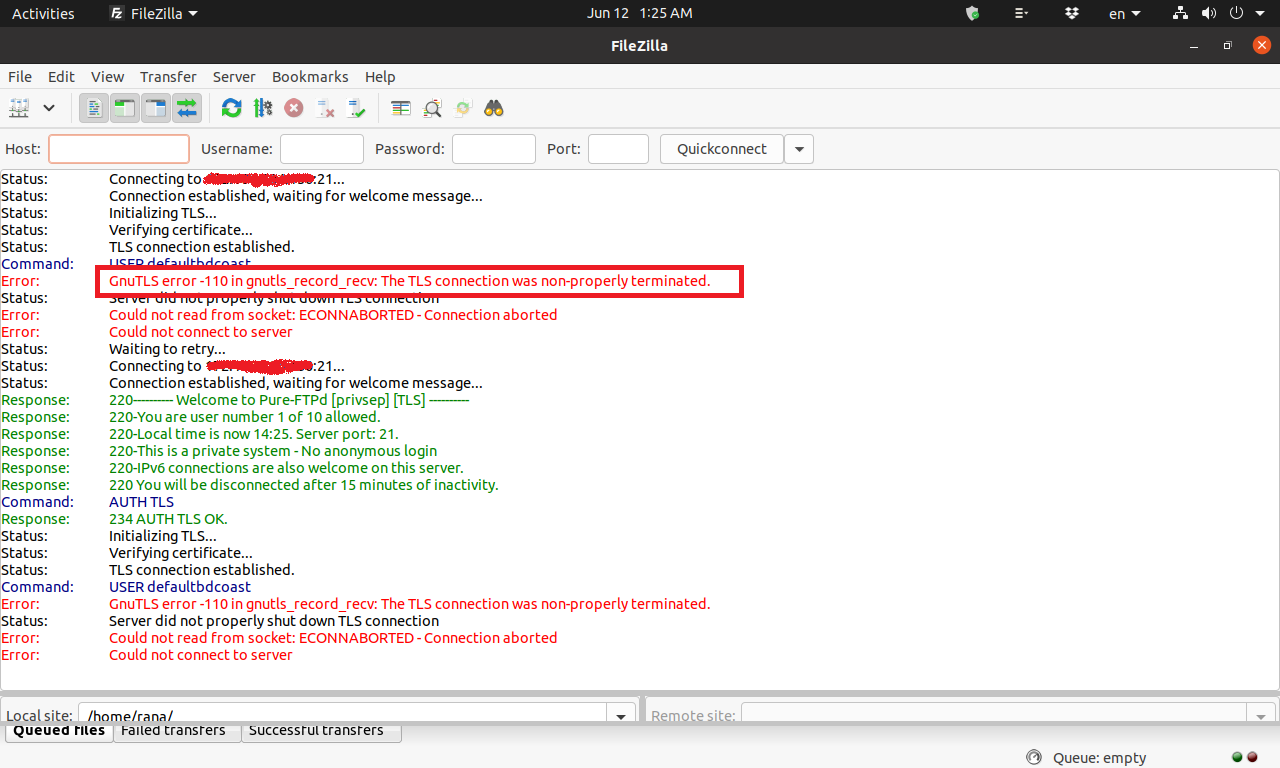
This is one of the most common FTP issues beginners face. Don’t worry — this guide will explain what it means and provide simple steps to fix it.
What Causes This FTP Problem?
This error usually happens because the TLS connection method in FileZilla is incompatible with Pure-FTPd. It’s a known bug and has been reported officially: Ubuntu Pure-FTPd Bug Report
In simple words: your FTP client (FileZilla) and your FTP server (Pure-FTPd) are not “speaking the same TLS language.”
2 Easy Ways to Resolve GnuTLS Error -110 in FTP
Solution 1: Upgrade Pure-FTPd to Fix the Bug
The easiest way to solve this ftp problem is to upgrade Pure-FTPd to version 1.0.47 or above.
Step 1. Download Required Packages (Ubuntu 18.04 example)
wget https://repo.mysql.com/apt/ubuntu/pool/mysql-8.0/m/mysql-community/mysql-common_8.0.21-1ubuntu18.04_amd64.deb
wget https://repo.mysql.com/apt/ubuntu/pool/mysql-8.0/m/mysql-community/libmysqlclient21_8.0.21-1ubuntu18.04_amd64.deb
wget http://mirrors.edge.kernel.org/ubuntu/pool/universe/p/pure-ftpd/pure-ftpd-common_1.0.49-4_all.deb
wget http://mirrors.edge.kernel.org/ubuntu/pool/universe/p/pure-ftpd/pure-ftpd-mysql_1.0.49-4_amd64.deb
(If you are not using Ubuntu 18.04, please download the matching packages for your version.)
Step 2. Install the Packages
dpkg -i xxx.deb xxx.deb xxx.deb xxx.debStep 3. Restart Pure-FTPd
systemctl restart pure-ftpd-mysqlSolution 2: Use an Older Version of FileZilla
If upgrading the server feels too complicated, you can also resolve this FTP issue by using an earlier version of FileZilla (older than version 3.40.0).
Recommended stable versions:
Conclusion
This FTP problem is caused by a known compatibility issue between Pure-FTPd and newer FileZilla versions. The best way to solve it is by upgrading Pure-FTPd. If that’s not possible, simply switch to an older FileZilla client.
With these steps, you now know the basics of FTP server troubleshooting. Even as a beginner, you can fix this error without deep technical skills.
ftp issues, ftp problem, ftp server troubleshooting