


Stable Diffusion XL (SDXL Base + Refiner) Benchmark in ComfyUI on RTX 5090
Our RTX 5090 GPU server generated four 1024 × 1024 images in approximately 15.11 seconds using Stable Diffusion XL (SDXL) Base + Refiner in ComfyUI. This benchmark examines generation speed, VRAM usage, and workflow usability to help users evaluate GPU requirements for AI image generation. If you need scalable GPU hosting for AI workloads, compare performance, memory capacity, and server costs before choosing a hosting provider or USA hosting provider.
Test Configuration
Server Hardware
- GPU: NVIDIA RTX 5090 with 32GB VRAM
- CPU: Dual Intel Xeon E5-2697 v4 (36 cores, 72 threads)
- RAM: 256GB
- Storage: 240GB SSD, 2TB NVMe, and 8TB SATA
- Operating system: Windows
Software and Models
- Interface: ComfyUI, Windows Portable version
- Base model: SDXL Base 1.0
- Refiner model: SDXL Refiner 1.0
Both models were downloaded through ComfyUI's model manager from Hugging Face.
Workflow and Generation Settings
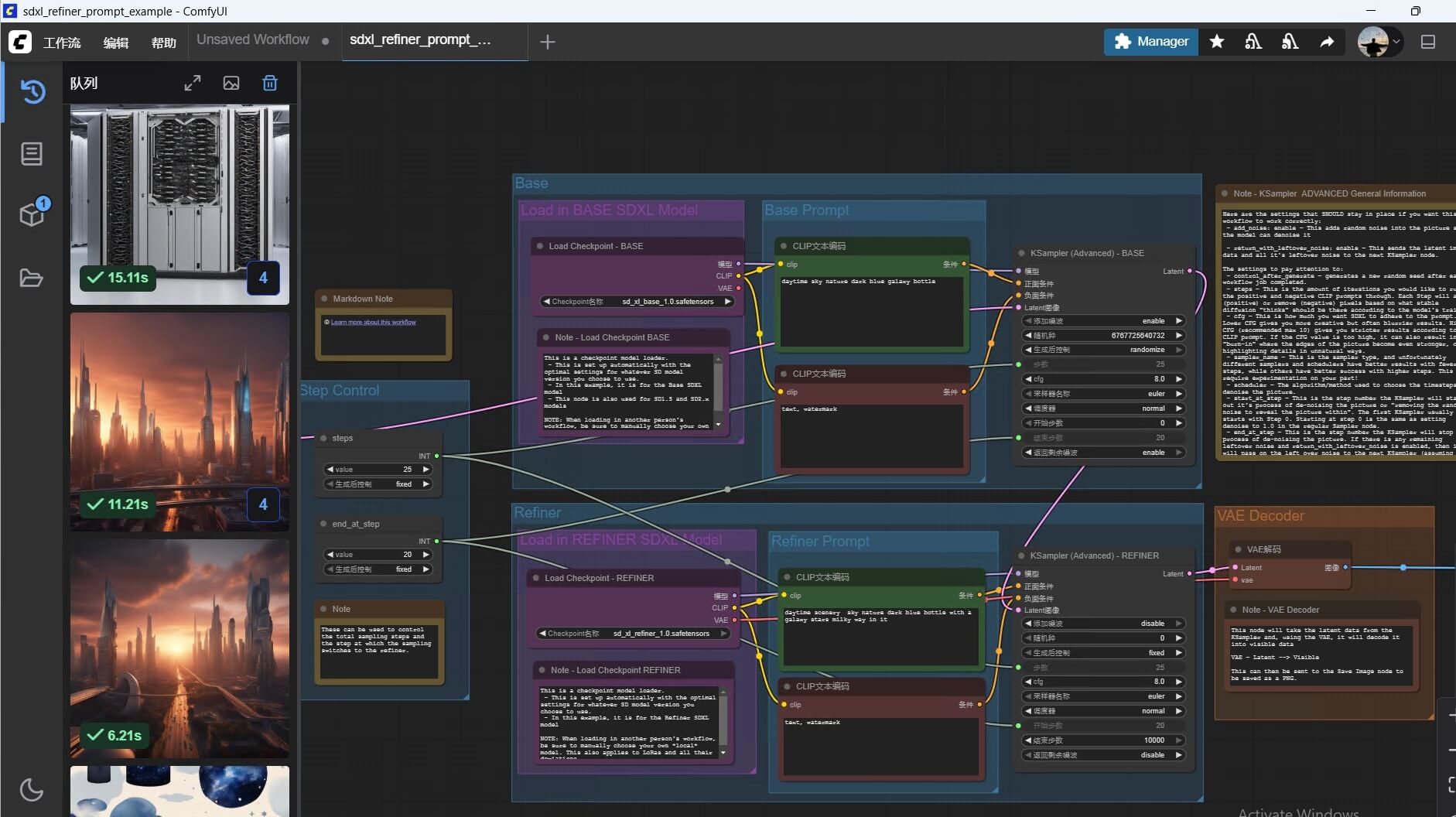
We used ComfyUI's SDXL Base + Refiner workflow. The base model performs the initial denoising steps, and the refiner handles the final detail-enhancement steps.
- Resolution: 1024 × 1024
- Total steps: 25
- Refiner end step: 20, with the refiner handling the final five steps
- Sampler: Default workflow setting
- Batch sizes: 1 and 4
- Precision: FP16, as configured by the workflow
RTX 5090 Performance Results
| Batch size | Peak VRAM usage | Total generation time | Images generated |
|---|---|---|---|
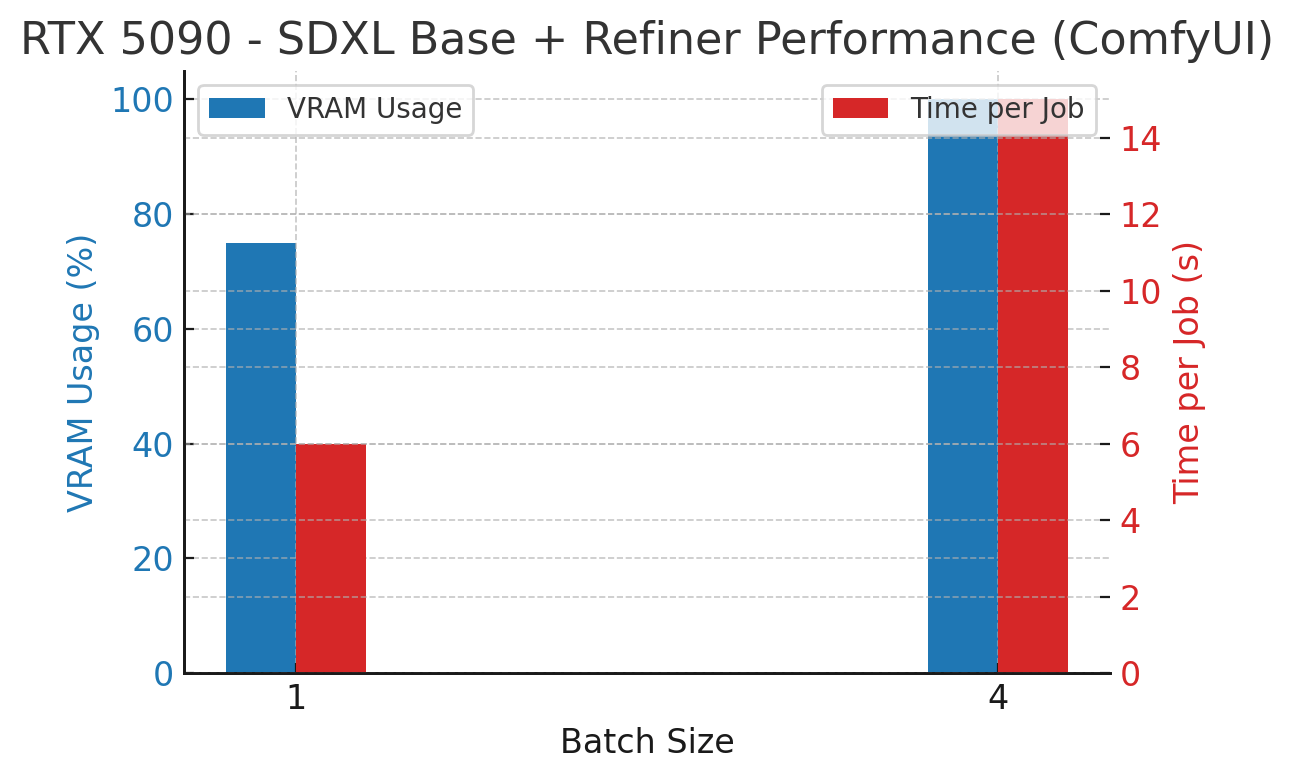
| 1 | Approximately 24GB (75%) | 6.21 seconds | 1 |
| 4 | Approximately 32GB (100%) | 15.11 seconds | 4 |
Key Observations
- Increasing batch size substantially increases VRAM consumption because more image data and intermediate tensors must be processed.
- The RTX 5090 completed a batch of four 1024 × 1024 images in approximately 15 seconds under this test configuration.
- ComfyUI automatically handled the transition between the base and refiner stages.
- The batch-four test reached the GPU's reported 32GB VRAM capacity, leaving little headroom for larger workloads or additional processing.
These results reflect one specific setup. Generation times can vary with model files, sampler, software version, GPU utilization, and workflow configuration.
How Much VRAM Does SDXL Require?
The following estimates provide a starting point for selecting a GPU. Actual requirements vary depending on resolution, batch size, precision, and memory optimization.
| Batch size | Approximate VRAM planning range | Example GPU capacity |
|---|---|---|
| 1 | 10–12GB | 16GB GPU |
| 2 | 18–20GB | 20–24GB GPU |
| 4 | 32–36GB | 32–48GB GPU |
These are planning estimates, not guaranteed minimum requirements. A 32GB GPU may handle a four-image batch with optimized settings, but some workflows may require more memory or use memory-saving techniques.
Increasing image resolution can significantly increase VRAM consumption. For example, a 2048 × 2048 image contains four times as many pixels as a 1024 × 1024 image, although actual memory use does not always scale exactly with pixel count.
Image Quality and ComfyUI Experience
SDXL Base + Refiner can improve image details compared with base-only workflows, depending on the prompt, model behavior, and settings. Prompt tuning and sampler selection remain important for achieving consistent results.
ComfyUI provides a node-based interface for building and modifying generation pipelines. Its key features include:
- Model management: Load and organize model checkpoints.
- Node library: Connect sampling, processing, and utility operations.
- Workflow templates: Reuse common setups, including SDXL Base + Refiner.
- Queue management: Schedule multiple image-generation jobs.
The RTX 5090 handled the tested workflow smoothly. However, remote desktop responsiveness was affected by network latency between China and the United States. This is separate from GPU generation speed; network quality, CPU performance, and RDP settings can all affect the remote-control experience.
RTX 5090 GPU Hosting for Stable Diffusion
Running SDXL locally requires a suitable GPU, sufficient VRAM, and a compatible software environment. A dedicated GPU server can be an alternative if you need remote access, predictable hardware resources, or the ability to run AI workloads without purchasing a GPU.
When comparing server hosting options, evaluate GPU memory, CPU resources, RAM, NVMe storage, network latency, and total cost. A reliable USA hosting provider may be suitable for remote AI development, but choose the server location based on where you and your applications need to connect.
Explore Database Mart GPU Servers for dedicated GPU infrastructure.
Conclusion
In this test, the RTX 5090 generated four 1024 × 1024 SDXL Base + Refiner images in approximately 15.11 seconds using ComfyUI, with peak VRAM usage reaching 32GB. It is a strong option for batch image generation, but memory requirements depend on the workflow and settings. For production workloads, leave sufficient VRAM headroom, validate performance with your own prompts, and compare GPU hosting costs against purchasing and maintaining hardware.
Stable Diffusion XL benchmark, SDXL Base, SDXL Refiner, ComfyUI performance, RTX 5090 AI image generation, VRAM usage, AI benchmark, Hugging Face SDXL, SDXL workflow, AI image rendering test